Proton Pass Review 2026: A Free Password Manager That Hides Your Email
Proton’s password manager, for freelancers who keep their own logins and their clients’.
Bottom line: Proton Pass Free is worth it if you work on more than one device and keep two clients or fewer apart; pay for Pass Plus if you need more vaults, unlimited two-factor codes, or a link that hands a client a login without an account.
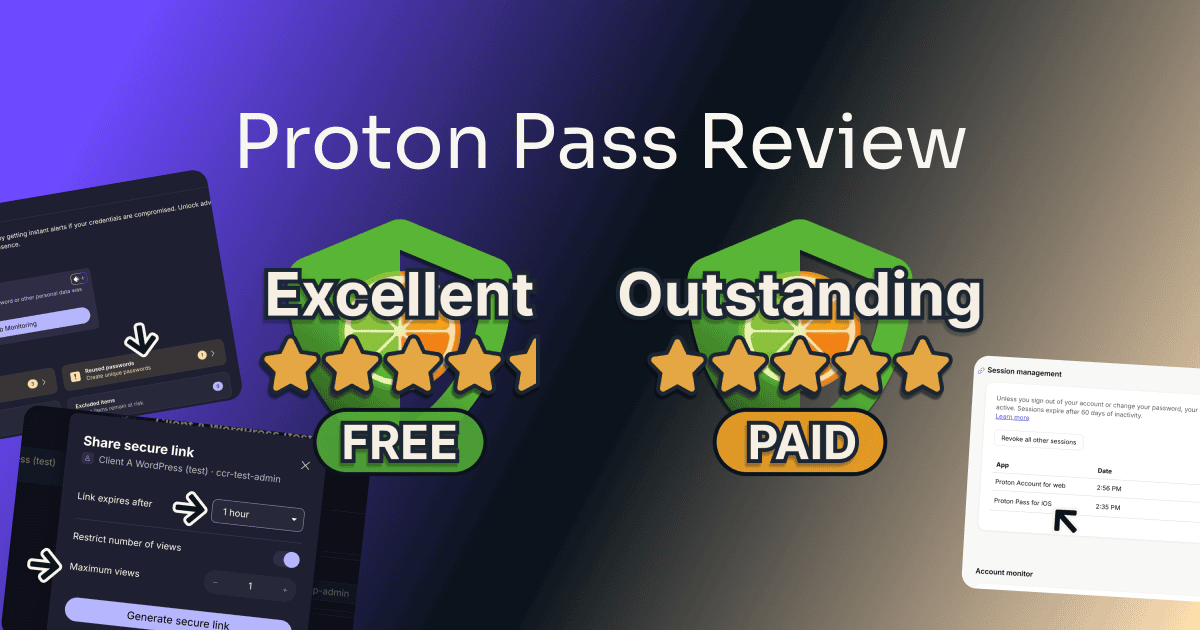
For this Proton Pass review I tested both of its one-person plans myself. Below is what the free plan gives away, where it stops, what Plus adds, and the one setting that leaves your vault open on a shared computer.
Table of Contents
This post has no active affiliate links yet. No affiliate program can change my scores.
Quick Verdict
FREE
Total Score:
4.5 / 5
two vaults, no folders
PASS PLUS
Total Score:
5 / 5
at $4.99 a month or $35.88 a year
Pros:
- Free stays signed in on multiple devices
- Weak and reused password alerts, free
- Fills a saved login in three clicks
Cons:
- Two vaults and no folders on Free
- No fingerprint unlock in the Chrome extension
Best for:
- Freelancers working across several devices
- Keeping your email off sign-up forms
- Handing a client a login, on Plus
Not for:
- Free users keeping more than two clients apart
- A shared computer, before you set a PIN
What Is Proton Pass?
Proton Pass is a password manager from Proton, the company behind Proton Mail and Proton VPN. It keeps logins, cards, notes, and identity details in vaults, generates passwords when you sign up somewhere, and fills them in when you sign back in. It also makes hide-my-email aliases, forwarding addresses that keep your real email off a site’s records.
You use it through a browser extension, the phone apps, a desktop app, and a web app, all on one Proton account. Proton’s apps page lists the extension for Chrome, Firefox, Brave, Edge, and Safari.
Proton’s Pass pricing page and apps page, read September 2026.
How Much Does Proton Pass Cost?
Proton Pass pricing starts with a free plan that has no time limit, no cap on logins, and no device limit. Pass Plus is sold by the month or by the year, and the yearly plan costs less per month.
| Plan | Free | Pass Plus | Pass Family |
|---|---|---|---|
| Monthly | $0 | $4.99 | $6.99 |
| Yearly, billed once | $0 | $35.88 | $59.88 |
| Yearly, per month | $0 | $2.99 | $4.99 |
| People | 1 | 1 | 6 |
| Devices | Unlimited | Unlimited | Unlimited |
| Vaults | 2 | 50 | 50 per person |
| Share a vault with | 2 others | 10 others | 10 others |
| Hide-my-email aliases | 10 | Unlimited | Unlimited |
| Storage for file attachments | 10 GB | 50 GB | |
| Everyday password tools ¹ | |||
| Pass Plus tools ² | |||
| Renewal price shown at checkout | Not applicable | Not shown | Not shown |
¹ Everyday password tools
- The password generator
- Saving and filling logins
- Import
- Unlimited logins, cards, and notes
- Weak and reused password alerts
- Passkeys
- Two-step sign-in on the account
- Export, encrypted or as a spreadsheet
- Support
² Pass Plus tools
- Sharing a single login or note, and secure links
- Unlimited two-factor codes kept beside your logins (Proton’s help page gives Free up to three)
- File attachments (100 MB per file)
- Item history
- Dark Web Monitoring
- Emergency Access
- Proton Sentinel and the command line tool (on Proton’s list, not tested)
Proton’s checkout prints no renewal price for the yearly plan, only “Renewal pricing subject to change,” and its terms say a changed price is charged at renewal.
Prices in USD from Proton’s US Pass pricing page and checkout, read 28 September 2026 and checked again 3 October 2026; they vary by region. The US checkout added sales tax, so check the current rate before you commit.
Canceling Proton Pass and Asking for a Refund
The Cancel subscription box sits at the very bottom of the web account’s Subscription page, not in the extension, and none of the four screens after it mentions the 30-day money-back guarantee.
Proton’s terms promise a full refund if you cancel and ask within 30 days of your first purchase, once per user, and only on a plan bought directly from Proton. You ask through the support form, which has no refund topic, so pick “Plans and billing” and write at least 100 characters; the terms say the refund is processed within 30 days.
I didn’t ask for my refund, so the steps after the form and how long the money takes aren’t tested. Refund terms can change and can differ by region, so read Proton’s current terms before you subscribe.
Source: Proton’s terms of service and Pass pricing page, read October 2026.
Interested?
How I Tested Proton Pass
I tested Proton Pass on a new account of my own, made with my tool-testing email address, in a separate Chrome profile. The vault held five made-up logins from a spreadsheet, a test card, a note, and a real Letterboxd account I signed up for with a Proton alias during the test. No real password of mine or a client’s went in.
I ran the free plan first and photographed every Pass Plus wall, then paid for one month of Pass Plus on the same account the same day, out of my own pocket. I tested in September and October 2026 on my computer, in Chrome and Proton’s Mac app, and on my phone.
Not tested: the refund (not asked for), Pass Family, Proton Unlimited, the business plans, Android, Windows, the free plan offline or with a passkey, aliases on your own domain, and the invited person’s side of a vault share. I opened no support ticket, because a made-up question wastes an agent’s time, so support speed isn’t measured.
| What I measured | Result | Plan |
|---|---|---|
| Sign-up to the open extension, recovery phrase included | about 6 min | Free |
| Logins arrived from a five-row Chrome spreadsheet | 5 of 5, in about 1 min 30 s | Free |
| Clicks from an empty sign-in form to signed in | 3 | Free |
| Devices signed in at once | 2 of 2, computer and phone | Free |
| Password Health on the made-up logins | 3 weak, 1 reused | Free |
| Clicks from the extension to help | 2, to a “Report a problem” form | Free |
| A one-view secure link, opened once, then tried again | Opened with no account the first time; the second time: “Secure link does not exist. Try reaching out to the link owner.” | Pass Plus |
| Screens to cancel, after Continue | 4, no retention offer | Pass Plus |
Is Proton Pass Worth It? Score Breakdown
I scored the free plan and Pass Plus, each on its own card, because they score differently.
FREE
Overall:
4.5 / 5
The two-vault limit, the settings that live only on the website, and fingerprint unlock that works only in the Mac app cost the half point. Every device stayed signed in, and the password alerts, aliases, and vault sharing all came free.
4 / 5
Ease of use
The support chat, the dark web settings, two-step sign-in, and emergency access sit on the website, and Pass’s own Support page links to none of them; fingerprint unlock worked only in Proton’s Mac app, never in Chrome. In the browser itself, saving a login took one click and filling it three.
4.5 / 5
Value
Two vaults and no folders leave a third client with nowhere of their own, while NordPass Free took every folder I made. In return, Free kept my computer and phone signed in together and flagged weak and reused passwords, with no time limit.
5 / 5
Features
Nothing was deducted. Sharing one login needs Plus, but a whole vault can go to two people on Free, so a client can still be given access.
5 / 5
Support
Pass itself offers a form, and the web account’s chat opens an AI assistant that promises a ticket “so a human expert can assist you faster.” On top, Proton’s official Reddit community, linked from Pass, gets answers from Proton’s own support team.
PASS PLUS
Overall:
5 / 5
The split with the website and fingerprint unlock only in the Mac app cost half a point each, which keeps Ease of use a full point lower, at 4. Every wall the free plan put up opened, and my link opened a login and its file in a browser with no Proton account.
4 / 5
Ease of use
Plus keeps both of the free plan’s faults: help and the dark web switch live on the website with no link from Pass, and the fingerprint still works only in the Mac app. After paying, one Close click took me back to work.
5 / 5
Value
Nothing was deducted. Plus opens unlimited aliases and two-factor codes, file attachments, and secure links, and its yearly price matches what NordPass Premium renews at.
5 / 5
Features
Everything Free locked opened, from a third vault and item history to emergency access, and a login with a file attached could still be shared. I added a two-factor code to a login by pasting its key under Edit, with no extra setup step.
5 / 5
Support
It’s the same form and chat as Free, and the assistant couldn’t say what the plan card’s “Priority support” means. Testing that would take a real ticket, so it stays Proton’s claim.
Not deducted, but worth knowing
- On Pass Plus, Dark Web Monitoring didn’t watch my sign-in address, which isn’t a Proton address, until I added it by hand and entered an emailed code. No points off, because it was watched once added; NordPass Premium named the address it watched from the start.
- On Pass Plus, a secure link shows the password to whoever opens it. No points off, because the link dies after the time and views you set; NordPass Premium’s Can autofill share kept the password hidden on my receiving account.
On the Support score. The extension’s route to help is Settings, then Support: two clicks to a “Report a problem” form that warns “Reports are not end-to-end encrypted,” with links to Reddit, X, and feature requests. The chat isn’t in Pass at all; I found it on the web account under the round account button, as “Chat with us.”
The assistant answered none of my questions itself, but each time it offered to pass me to a human advisor who replies by email. I never took the offer, so the human is Proton’s word, not my test.
Ready to try it?
Key Features of Proton Pass
On Free too
Every Device Signed In at Once, Even on Free
Proton Pass Free has no device limit, and that’s the biggest difference from NordPass Free. I signed in on my iPhone while the Chrome extension on my computer stayed signed in, refreshed it to be sure, and the account’s session list showed both.

Free, with limits
Two Vaults on Free, and No Folders
Proton Pass Free stops at two vaults, and it has no folders, so you can keep two clients apart and no more. My third vault hit a wall.
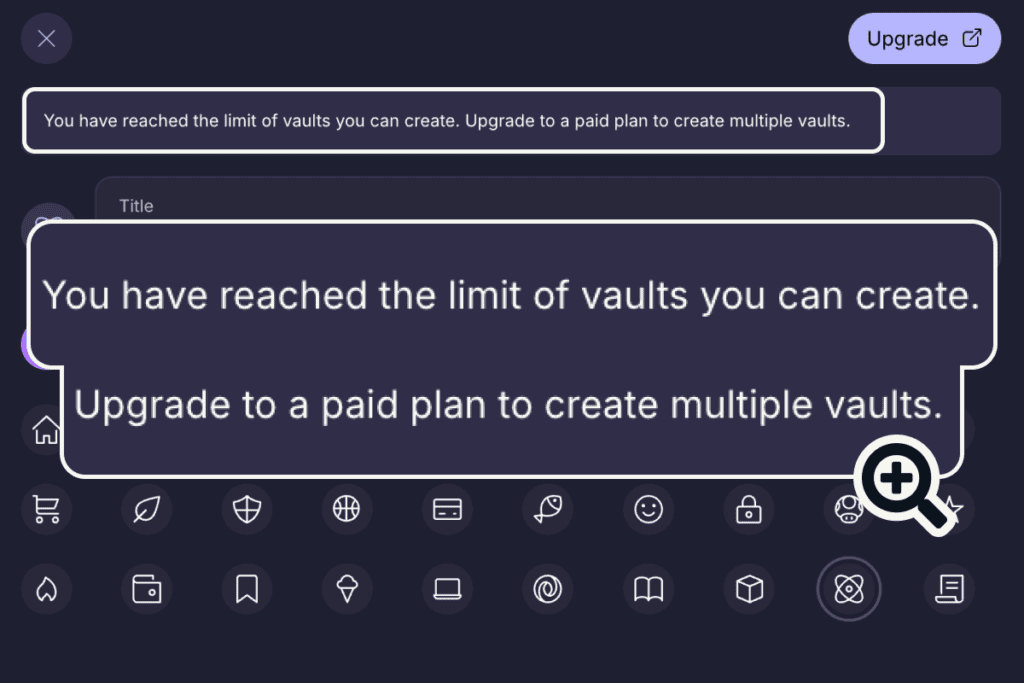
The message reads “Upgrade to a paid plan to create multiple vaults.”
Free, with limits
Hide-My-Email Aliases: 10 on Free, Unlimited on Plus
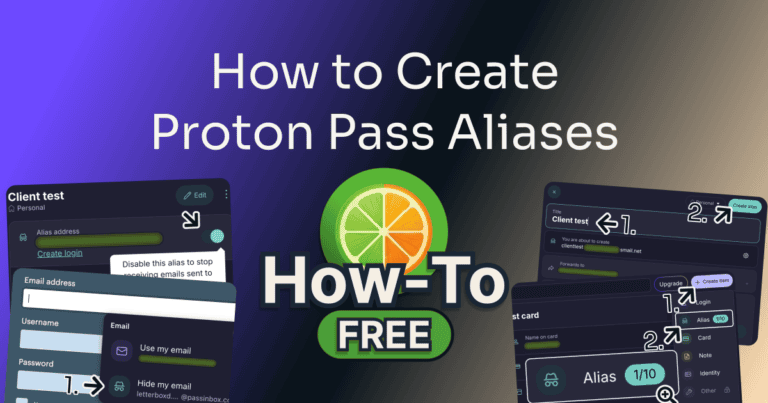
Proton Pass gives the free plan 10 hide-my-email aliases, and on a sign-up form one is a single click away. Clicking Letterboxd’s empty email box brought up “Use my email” and “Hide my email,” with an alias already named after the site.
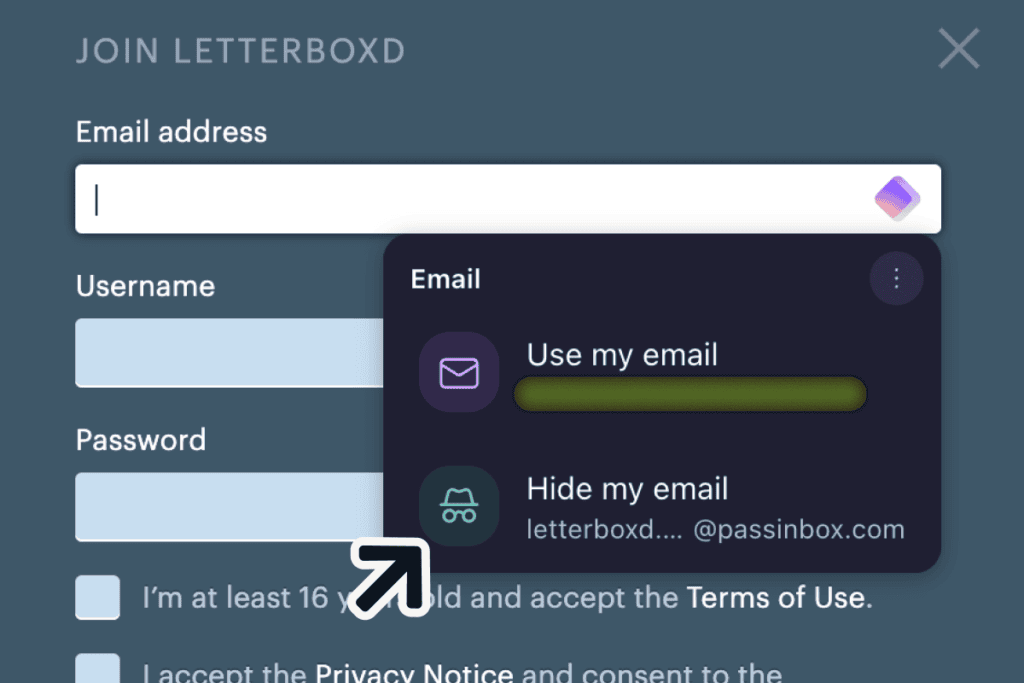
An email I sent to that alias from another address arrived in my test mailbox. My guide to creating Proton Pass aliases also shows how to reply from one.
Every plan
Is Proton Pass Safe? Lock It on a Shared Computer
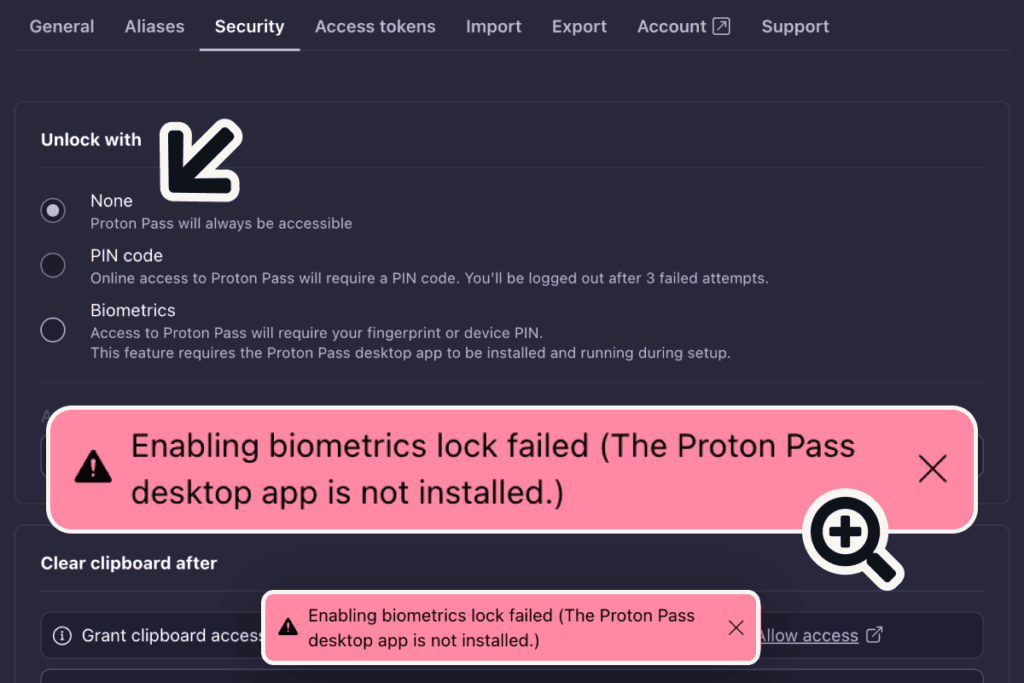
Proton Pass held up where I could check it, but its standard lock setting leaves the extension open. Proton says the vault is end-to-end encrypted, which no user can verify, so it stays Proton’s claim. Out of the box, “Unlock with” is set to None, “Proton Pass will always be accessible,” and after I quit and reopened Chrome the extension opened straight into my vault with no password.
On a computer other people use, anyone who opens that Chrome profile gets every login. One setting fixes it: in the extension, Settings, then Security, set Unlock with to PIN code. Fingerprint unlock is the other choice, but it failed in Chrome, and once I installed Proton’s Mac app it worked only in that app.
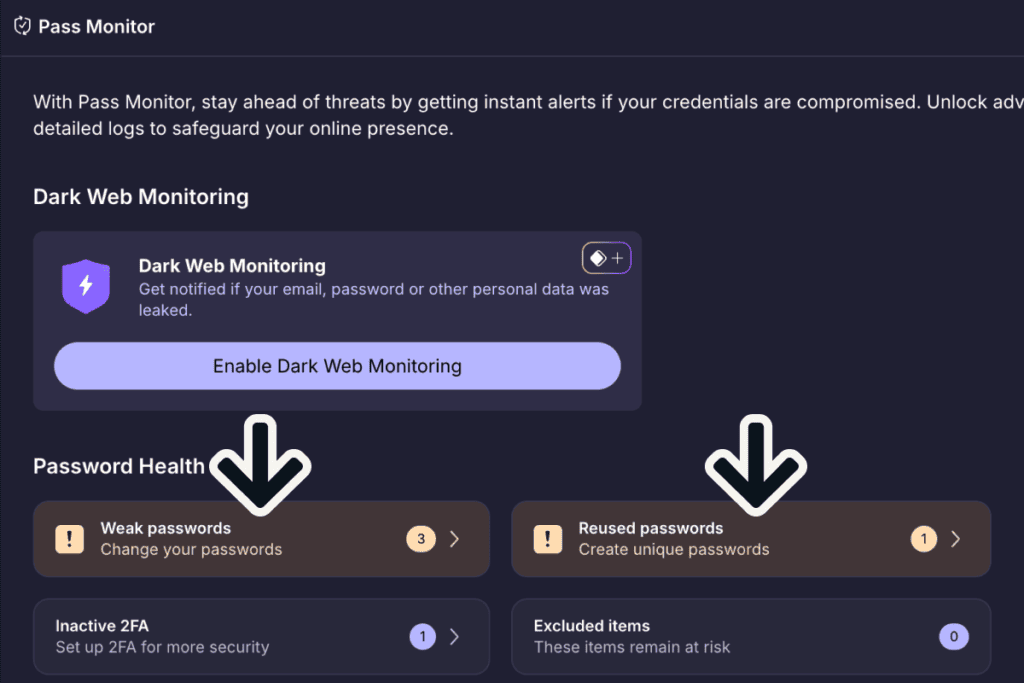
Proton Pass gives the free plan the password checks NordPass keeps for Premium. Pass Monitor flagged three weak passwords and one used on two logins, and each opened with a banner telling me to change it.
The recovery phrase Proton makes you save at sign-up is the part to keep safe outside Proton Pass, because without it a forgotten password can cost you the vault’s contents (the FAQ below has the details).
On Free too
Getting Started and Daily Use: A Recovery Phrase You Can’t Skip
Proton Pass’s sign-up was easy to find, a “Create free account” button on its website, and unlike NordPass it made me save a recovery phrase before I could go on. I had to download or copy the phrase and tick “I understand that if I lose my recovery phrase, I may permanently lose access to my account.” The whole sign-up, to the open extension and past a “Special Offer!” pop-up for Plus, took about 6 minutes.
Proton’s import screen names browsers and password managers, NordPass, 1Password, Bitwarden, and LastPass among them, plus a generic spreadsheet. My Chrome-format file went in as it was, all five logins arrived with their web addresses and notes in about 1 minute 30 seconds, and Proton let me send the whole import to a vault of its own.

Proton Pass handles the daily password job well on the free plan. On Letterboxd’s sign-up form, the password box offered a 20-character password, with a length slider and switches for symbols, capitals, and numbers. The moment it filled, a “Save login” panel appeared, before I’d pressed Sign up.
Signing back in was easy: a “Log in as…” suggestion appeared under the empty box on its own, and it took 3 clicks from the empty form to signed in. On my phone, the iPhone offered to fill the same login from Proton Pass, and Face ID did the rest.
Part free
Part Plus
Sharing With a Client: Free Shares a Vault, Plus Sends a Link
Proton Pass lets the free plan share a whole vault, and Plus adds the share I’d use most with a client, a link they open without an account. On Free I invited an address to a vault as a Viewer (Proton’s other roles are Editor and Admin) with no upgrade wall, while sharing one login carried the Plus badge.
On Plus, sharing one login “With other Proton users” refused my non-Proton address: “Only existing users can be invited to access an item.” The secure link has no such limit, and you set how long it lasts and how many times it opens.
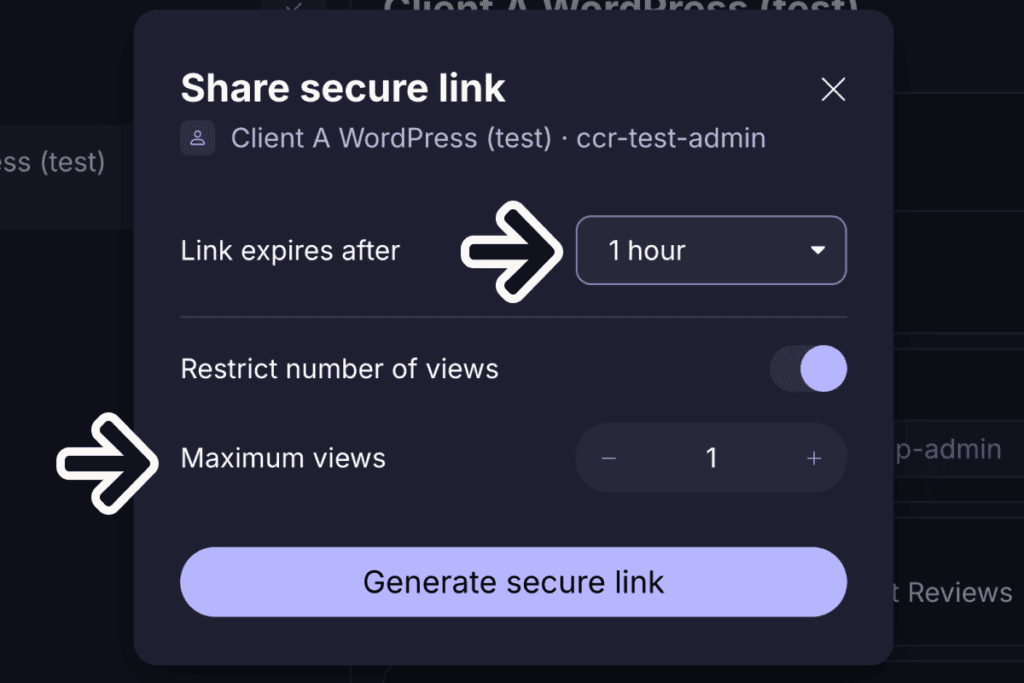
I opened my one-hour, one-view link in a private window with no Proton account. It showed the username, the password, the website, the note, and the attached file to download, with no sign-up at all.

A login with a file attached could be shared this way too, which NordPass Premium refuses.
Are you convinced?
Proton Pass: Pros and Cons
Pros:
- Free stays signed in on multiple devices
- Weak and reused password alerts on Free
- A click to save a login and 3 to fill it, on Free
- Hide-my-email aliases offered right on sign-up forms, 10 on Free
- A whole vault can be shared with two people on Free
- Secure links on Plus open without an account, file included, and expire
- Two-factor codes on Plus with no extra setup step
Cons:
- Two vaults and no folders on Free
- Help, the dark web switch, and two-step sign-in live on the website, unlinked from Pass
- Fingerprint unlock works only in the Mac app, not in Chrome
- The extension opens with no password until you set a PIN
- Dark Web Monitoring skips a non-Proton sign-in address until you add it
- Canceling sits at the very bottom of the Subscription page
Who Should Use Proton Pass?
Who Should Use Proton Pass Free?
FREE
Who it’s for:
- Freelancers on a laptop and a phone who want both signed in
- Anyone keeping their real email off sign-up forms
Who it’s not for:
- Freelancers with more than two clients to keep apart: Plus
- People on a shared computer who won’t change the lock setting
Who Should Use Pass Plus?
PASS PLUS
Who it’s for:
- Freelancers with more than two clients to keep apart
- Freelancers sending a client a login and its file without an account
Who it’s not for:
- Anyone who wants to unlock the Chrome extension with a fingerprint
Free Alternatives to Proton Pass
Both have a free plan. I haven’t tested Bitwarden yet, so its line comes from its own pages.
NordPass Free kept every client in a folder of their own, though it allows one signed-in device at a time and locks the password checks Proton gives away; every test is in my NordPass review and my Proton Pass vs NordPass comparison.
Bitwarden says its free plan works on unlimited devices and sorts logins into folders, the place where Proton Pass Free stops at two vaults.
Bitwarden’s own pages, read October 2026.
Frequently Asked Questions
Is Proton Pass free?
Yes, Proton Pass has a free plan with no time limit, unlimited logins, and no device limit, and in my test it covered the daily password work, password alerts, and 10 aliases. The catch is the two-vault limit. Sharing one login and file attachments need Pass Plus; for two-factor codes, Proton’s plan table says Plus, while its help page lets Free keep up to three.
What does Proton Pass cost per month?
Pass Plus costs $4.99 a month, or $2.99 a month on the yearly plan, billed once as $35.88. The free plan costs nothing, and Pass Family covers six people for $6.99 a month or $59.88 a year. These are Proton’s US prices before sales tax, and its checkout shows no renewal price, only “Renewal pricing subject to change.”
Does Proton Pass work offline?
Yes, on Pass Plus the extension opened my vault with Wi-Fi off after my password and a “Continue offline” click, and a password copied. The first copy asked once for clipboard permission, and Proton offered to clear the clipboard after 2 minutes. I didn’t test the free plan offline.
What happens if I forget my Proton Pass password?
Proton offered me three ways back: the 12-word recovery phrase, a reset from a phone or browser still signed in, or a QR code from another device. Proton’s help pages on account recovery, read October 2026, say a reset by email or text alone may leave your Pass items unreadable, while the recovery phrase, a recovery file, or your old password brings them back. I stopped before resetting, so the reset itself isn’t tested.
Can I get my money back from Proton Pass?
Proton’s terms of service, read October 2026, give a full refund if you cancel and ask within 30 days of your first purchase, once per user, on a plan bought directly from Proton. I didn’t ask for mine. Refund terms can change and can differ by region, so read Proton’s current terms before you subscribe.
Is there a Proton Pass for business?
Yes, Proton sells business plans for teams, Pass Essentials and Pass Professional, priced per user. I didn’t test them; I tested the free plan and Pass Plus, the plans one person buys for themselves.
Final Verdict: Is Proton Pass Worth It?
Proton Pass is worth it for a freelancer who works across a laptop and a phone. The free plan keeps every device signed in, flags weak and reused passwords, and hands out aliases on sign-up forms. Pass Plus is the upgrade when you need more than two vaults or want to send a client a login by link.
The two-vault cap is the wall most freelancers will hit on Free. Help and a few settings live on the website, and the extension stays open until you set a PIN, so do that first on any computer you share.
FREE
Overall:
4.5 / 5
4 / 5
Ease of use
4.5 / 5
Value
5 / 5
Features
5 / 5
Support
PASS PLUS
Overall:
5 / 5
4 / 5
Ease of use
5 / 5
Value
5 / 5
Features
5 / 5
Support
Evidence verified: October 2026.

By Jonas Moons, founder & reviewer
I test every tool on Clear-Cut Reviews myself. No ghostwriters, no faceless team. If a tool falls short, I say so, even when it earns me nothing.