NordPass Review 2026: Its Free Plan Keeps Every Client in a Folder
NordPass is a password manager with a free plan and a Premium upgrade, for freelancers who keep their own logins and their clients’.
Bottom line: NordPass Free is worth it if you work from one device: generating and saving a login took a click each, filling it took three, and folders keep clients apart. Pay for Premium if you switch between devices all day or need to share logins with clients.
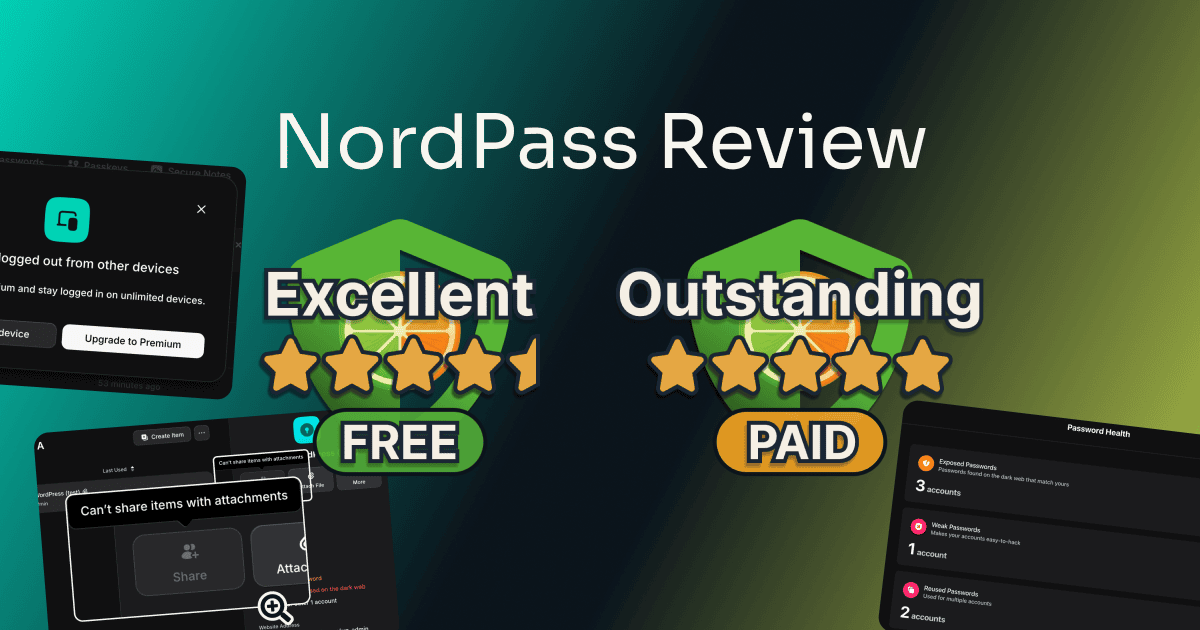
For this NordPass review I ran a fresh account through the free plan first, then paid for a year of Premium on the same account. Below is where the free plan stops, what Premium adds, and the two things that caught me out: the one-device rule and a reset that wipes the vault.
Table of Contents
This post has no active affiliate links yet. No affiliate program can change my scores.
Quick Verdict
FREE
Total Score:
4.5 / 5
one signed-in device at a time
PREMIUM
Total Score:
5 / 5
at $23.88 the first year, then $35.88 a year
Pros:
- Fills a saved login in three clicks
- Unlimited logins and a folder per client
- Premium stays signed in on multiple devices
Cons:
- Free signs out your other device
- Sharing a login needs Premium
Best for:
- Freelancers who work on one device
- Client logins kept in folders
- Handing a client a login, on Premium
Not for:
- Free users working on more than one device
- Sharing logins that carry an attached file
What Is NordPass?
NordPass is a password manager from Nord Security, the company behind NordVPN, sold by nordvpn S.A. It stores your logins, cards, notes, and documents in an encrypted vault, generates passwords when you sign up somewhere, and fills them in when you sign back in. You use it mostly through a browser extension and the phone apps.
How Much Does NordPass Cost?
NordPass has a free plan with no time limit and no cap on how many logins you save. Premium has no monthly option. You buy one or two years, and every price on the page is a first-term price that renews higher.
| Plan | Free | Premium | Family |
|---|---|---|---|
| 1-year plan, first year | $0 | $23.88 | $44.28 |
| 2-year plan, first term (27 months) | $0 | $37.53 | $67.23 |
| After the first term, each year | $0 | $35.88 | $71.88 |
| People | 1 | 1 | 6 |
| Everyday password tools ¹ | |||
| Signed in on several devices at once | |||
| Premium NordPass tools ² |
¹ Everyday password tools
- The password generator
- Saving and filling logins
- Import
- Unlimited logins
- Folders
- Cards, secure notes, and documents
- Password history
- Fingerprint unlock
- Two-step sign-in on the account
- Export
- 24/7 support
² Premium NordPass tools
- Sharing a login
- File attachments (40 MB per file)
- Password Health
- The Data Breach Scanner
- Email Masking
- The NordPass Authenticator for two-factor codes
- Emergency Access (I saw only its upgrade page, on Free)
The renewal is charged 14 days before your year ends, by NordPass’s subscription terms, so cancel earlier than the end date if you don’t want the second year. The US page also adds three extra months to the 2-year plan, a NordPass promotion its own terms end on 21 October 2026; those terms add the months only if the subscription isn’t canceled within the 30-day money-back window, and say a refund inside it cancels the promotion.
Prices in USD from NordPass’s US plans page and checkout, read 28 September 2026 and checked again 3 October 2026. They vary by region, and the US checkout added sales tax, so check the current rate before you commit. The renewal timing comes from NordPass’s subscription terms, read September 2026, and the promotion from its promotion terms, read October 2026.
Canceling NordPass and Asking for a Refund
Canceling auto-renewal on Premium took me two clicks, and it was faster than I expected. In Nord Account, Billing, I clicked Cancel, then “Cancel auto-renewal” on a screen that lists what you lose when the year runs out. There was no retention offer and no string of pop-ups to click past.
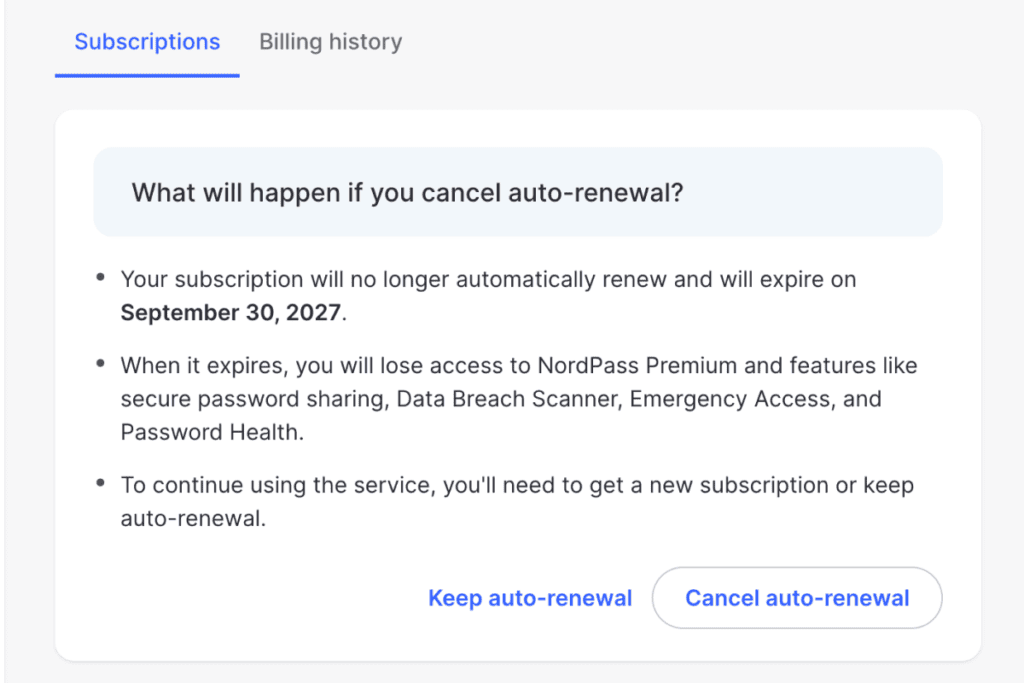
None of the cancel screens mentions the 30-day money-back guarantee. NordPass’s help page on its money-back policy says the guarantee covers the first purchase only, and that you claim it by canceling within 30 days and then contacting support; its cancel page adds that canceling “does not automatically result in a refund.”
I haven’t asked for my refund yet, so the steps and how long the money takes aren’t tested. Refund terms can change and can differ by region, so read NordPass’s current terms before you subscribe.
Source: NordPass’s help pages on refunds and canceling, read October 2026.
Interested?
How I Tested NordPass
I tested NordPass on a new account of my own, made with my tool-testing email address, in a separate Chrome profile so my own NordPass never touched it. The vault held five made-up logins from a spreadsheet, a test card, a note, and a real Letterboxd account I signed up for during the test. No real password of mine or a client’s went in.
I ran the free plan first and photographed every Premium wall, then paid for a year of Premium on the same account the same day, out of my own pocket. I tested in September and October 2026 on two devices: a computer with Chrome and a phone. For the receiving side of a share, I made a second account, on the free plan, with a throwaway address.
The encryption itself no user can check, so it stays NordPass’s claim. Not tested: the refund (not asked for yet), the Family and business plans, Android and Windows, and the free plan offline or with a passkey. I opened no support ticket, because a made-up question wastes an agent’s time, so support speed isn’t measured.
| What I measured | Result | Plan |
|---|---|---|
| Adding the extension to the first vault screen, sign-up included | about 5 min 30 s, two passwords set | Free |
| Logins arrived from a five-row Chrome spreadsheet | 5 of 5, in about 1 min 16 s | Free |
| Clicks from an empty sign-in form to signed in | 3 | Free |
| Devices signed in at once | 1 (signing in on the phone signed the computer out) | Free |
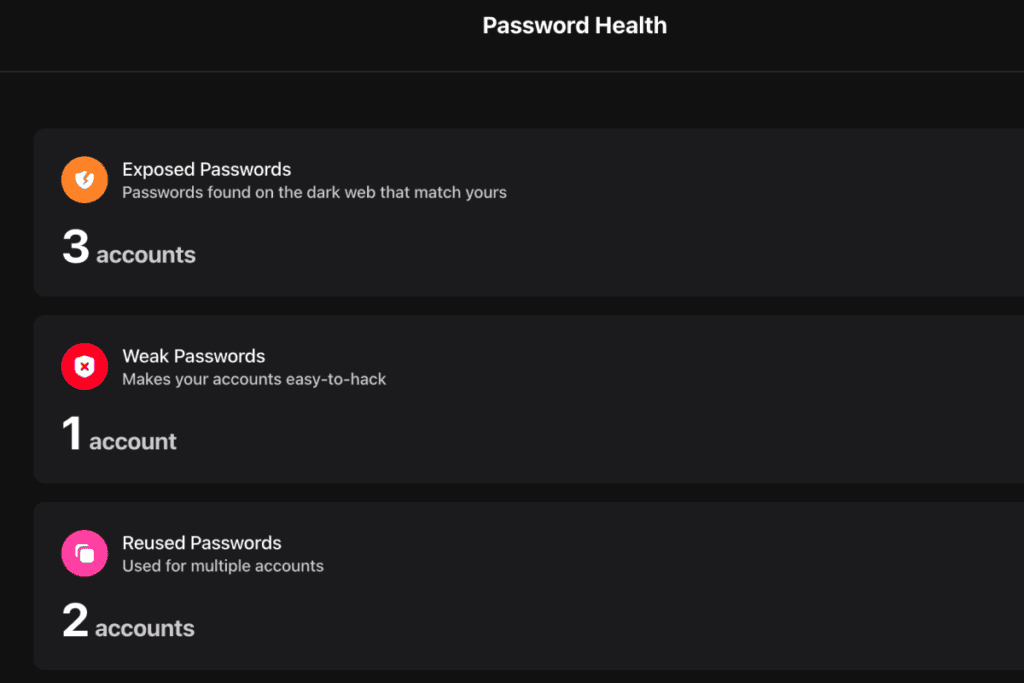
| Password Health on the made-up logins | 3 exposed, 1 weak, 2 reused | Premium |
| Clicks to take back a shared login | 4, from the opened login | Premium |
| Clicks to cancel auto-renewal | 2, no retention offer | Premium |
| The support assistant, asked about a human on Free | “Support is available 24/7 for all NordPass users, including those on the free plan.” | Free |
Is NordPass Worth It? Score Breakdown
I scored the free plan and Premium, each on its own card. NordPass Free is the headline score, because it’s the plan you meet first. Not covered: Family, or the business plans (Teams, Business, and Enterprise), which are sold for five users or more and add an admin panel and Shared Folders.
FREE
Overall:
4.5 / 5
A single signed-in device, locked password checks, locked sharing, and the hunt for sign-up and help cost the half point. Saving and filling logins, folders, import, and export all came free.
4.5 / 5
Ease of use
The website has no sign-up (the account is made in the extension), and help sits near the bottom of Settings. After that, the daily work happened in the browser without opening the vault.
4 / 5
Value
Signing in on my phone signed my computer out, and Password Health is Premium, while Proton Pass’s free plan flagged my weak test passwords the same day. In return, Free took every folder I made (ten), and NordPass promises unlimited logins with no time limit.
4.5 / 5
Features
Sharing a login with a client is locked on Free. Every other daily job, from cards and notes to export, worked.
5 / 5
Support
The help center’s chat starts with an AI assistant, which said a person can be requested in the same chat, 24/7, free users included. NordPass links no user community, which costs nothing here while NordPass itself says a person is on offer.
PREMIUM
Overall:
5 / 5
Only Share hiding on a login with a file cost anything. Multiple devices at once, sharing with four access levels, and Password Health all worked, and the Authenticator opened.
4.5 / 5
Ease of use
Share hides on a login with a file: it’s greyed out, with the reason only on hover, and left out of that login’s menu in the vault list. A Premium buyer makes the account at the checkout, so the free plan’s sign-up hunt doesn’t apply.
5 / 5
Value
Nothing was deducted. The first year opens every wall on the free plan, and it costs less than a year of Proton Pass Plus.
5 / 5
Features
Everything Free locked opened, and several logins can go out in one share, though a folder can’t be shared on Premium.
5 / 5
Support
It’s the same chat as Free, and the assistant said Premium gets no faster or priority line.
Not deducted, but worth knowing
- On Premium, the person you share a login with must make a NordPass account first, though a free one is enough. No points off, because the login still reaches them; Proton Pass Plus sends a link they open without an account.
- On Premium, a login with a file attached can’t be shared, so the file comes off first. No points off, because few freelancers send a file with a login; Proton Pass Plus shares the login and its file in one link.
- On Premium, a share set to end after an hour kept working when it was accepted after that hour, until I removed it. No points off, because it’s an edge case, and a share accepted in time did end by itself.
On the Support score. The route to help is Settings, then Visit Help Center near the bottom (two clicks and a scroll), then “Chat with support” on the help center, with no help icon in the vault. The chat asks for a name, an email address, and the account type, then “NordPass AI” answers.
When I asked on the free plan whether I could reach a human, its second reply was plain.
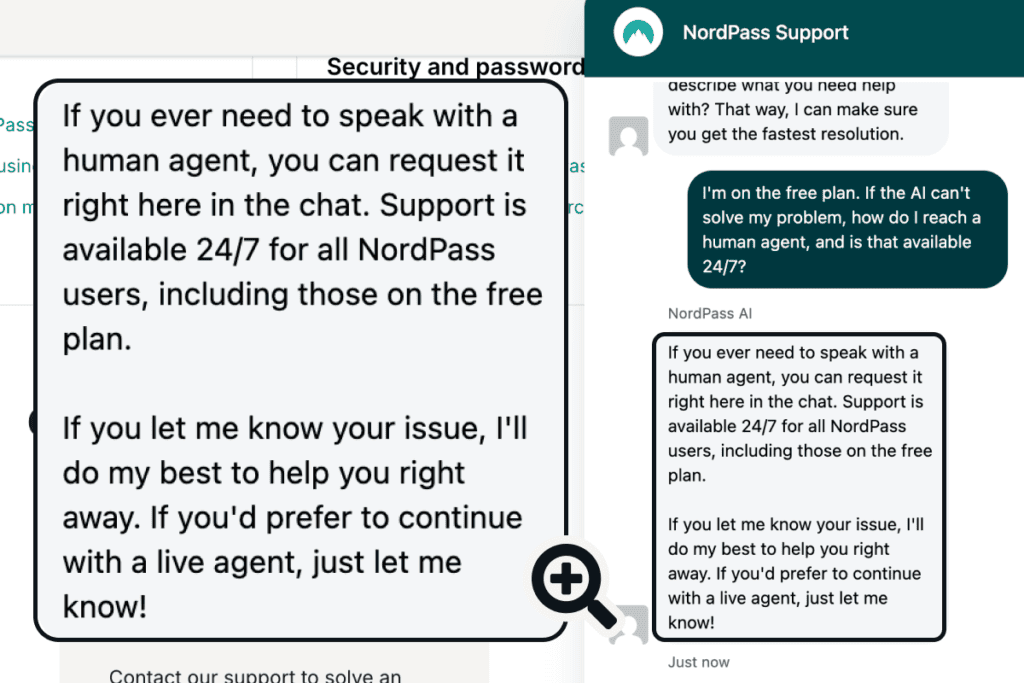
I didn’t call an agent in, so the 24/7 person is NordPass’s word, not my test. On Premium, the same assistant said “Support is the same for all NordPass users, including Premium,” and that everyone gets “24/7 help through live chat and email.” Reviews on Trustpilot mostly complain about auto-renewal and charges after canceling, not about reaching support (read September 2026).
Fits the way you work?
Key Features of NordPass
On Free too
Getting Started: No Sign-Up on the Website, Then a Smooth Import
I looked for a sign-up form on NordPass’s website and couldn’t find one, because there isn’t one. Its Login menu offers vault access and subscription management, and every “Start Free Plan” button leads to the download page, so you make the account inside the extension after installing it.
From adding the extension to the first vault screen took about 5 minutes 30 seconds, with two passwords along the way, one for the Nord Account that handles billing and a separate master password that unlocks the vault. The setup was pretty smooth.
NordPass’s import screen lists six browsers, nine password managers (1Password, Bitwarden, LastPass, and Proton Pass among them), and a spreadsheet. My Chrome-format file went in as it was, without NordPass’s own CSV template, and all five logins arrived with their web addresses and notes in about 1 minute 16 seconds.

The free vault keeps an “Upgrade to Premium” bar along the bottom with no close button, though it blocks nothing.
Besides the extension and the NordPass app on my phone, there’s a NordPass web vault: on Premium, my whole vault opened in Safari with no extension, after the same two passwords.
On Free too
Generate, Save, and Fill: Three Clicks to Signed In
NordPass does the daily job well on the free plan. When I signed up for Letterboxd, clicking the password box opened a generator with a 20-character password; one click used it, and after sign-up a “Save Login Details” panel saved the username and password with one more.
The NordPass password generator lets you switch to words instead of characters, change the length, and turn symbols, capitals, and digits on or off, and I thought it was great.
Signing back in was easy, 3 clicks from the empty form (the username box, NordPass’s suggestion, Sign in), and both boxes filled at once.
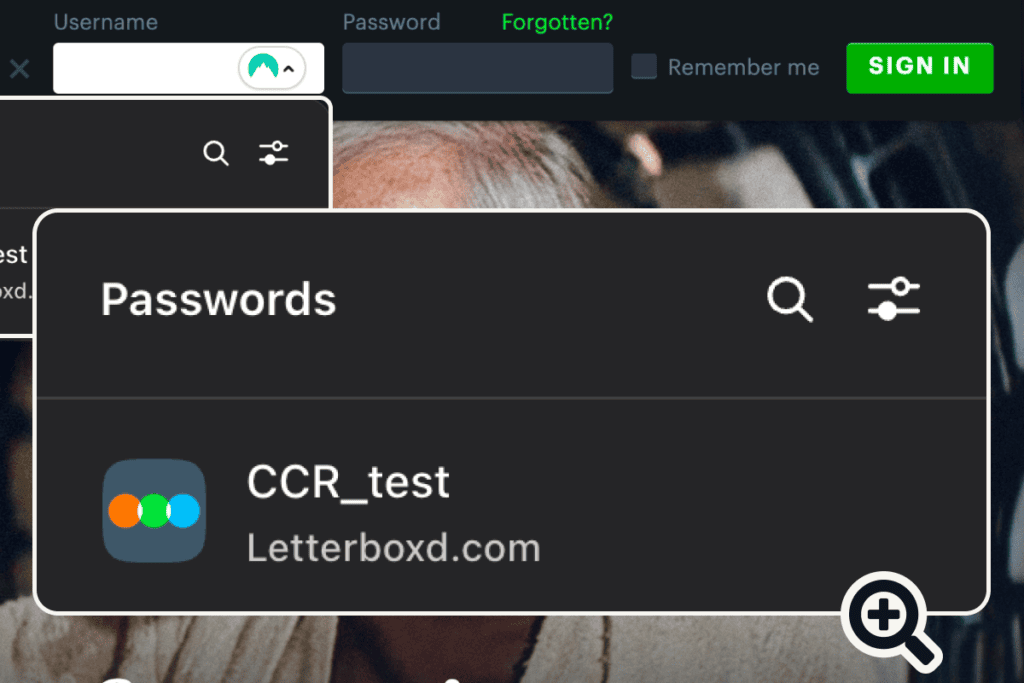
On my phone, tapping the same box brought up face unlock, and one glance filled both fields and signed me in. It was even easier there than on the computer.
Free, with limits
One Device at a Time on Free
NordPass Free keeps you signed in on one device at a time, and that’s the limit you’ll feel most. When I signed in on my phone, the Chrome extension on my computer signed itself out; signing back in on the computer brought up this pop-up.

The pop-up reads “Upgrade to Premium and stay logged in on unlimited devices.” A note I added on the phone still reached the computer, so syncing works; it’s staying signed in on both that stops. I think a freelancer can live with it, but only one who works on a single device.
Premium lifts the limit. I tested it on my two devices, and both stayed signed in together through a refresh.
Part free
Part Premium
What Premium Opens: Password Health, Breach Alerts, and Two-Factor Codes
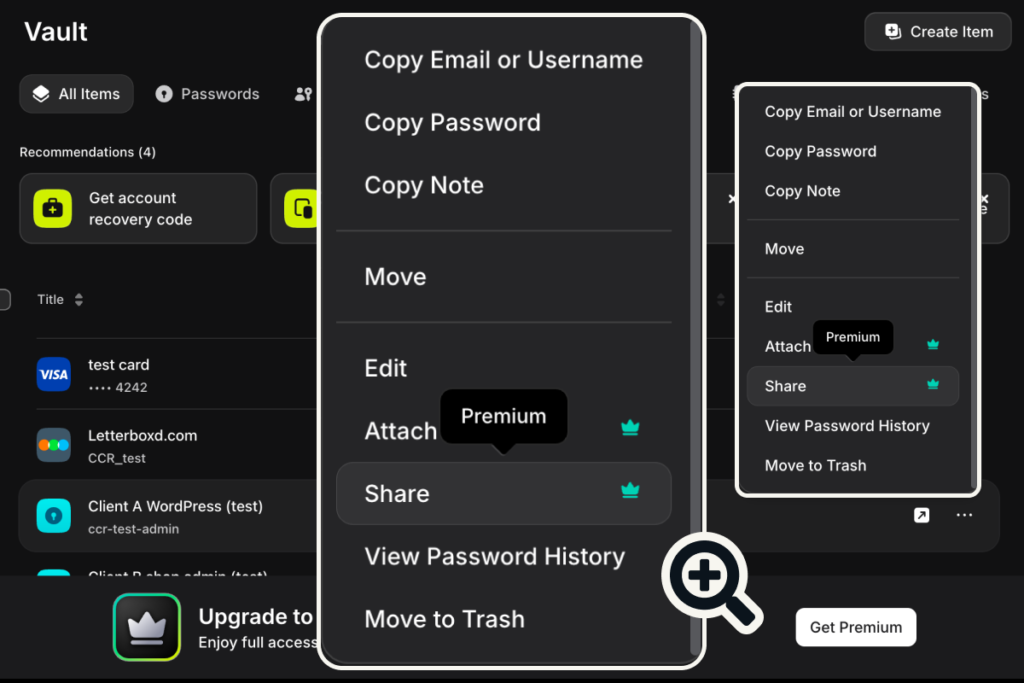
Most of NordPass’s security extras are Premium, and on the free plan each carries a crown. On Free, a login’s menu marked Share and Attach “Premium”, and Password Health, the Data Breach Scanner, Email Masking, and giving Emergency Access each opened an upgrade page. Free still rates each password on its own login (“Moderate Password”) and keeps your password history, documents, and folders.
On Premium, Password Health first asked to scan, noting that it shares hashed passwords with an outside provider. It then flagged 3 exposed, 1 weak, and 2 reused passwords. All of them were made-up test passwords common enough to sit in breach lists, which is the point of the check.
The other Premium tools worked too. The Data Breach Scanner found no breaches for my test email, Email Masking made a forwarding address in one click with no limit shown, and a 3.5 MB file attached to a login (40 MB is the cap per file).
The Authenticator keeps your 2FA codes beside your logins, for sites that use MFA, and sits under Edit, “Add Two-Factor Code”. Setting it up asked for a fingerprint passkey plus a code sent by email before the first code, and I stopped at that emailed code. On Premium, NordPass also saved and used a passkey on a test site, one click each way.
Premium only
Sharing Logins With a Client
Sharing is the main reason a freelancer would pay for NordPass Premium, and the first catch is that the client needs a NordPass account. On Premium I shared a login with one of my own addresses, and the email said, “To accept this item, create a NordPass account and download the app.” There’s no link that works without an account, but a free one is enough, and accepting on my new free account took two clicks.
Finding Share was the hard part on a login with a file attached. It’s greyed out, with the reason only on hover, and that login’s menu in the vault list leaves it out; a folder’s menu has no Share at all.

So if you keep a contract or an invoice on a client’s login, you remove the file before you can share it, and a shared login can’t take a file either. A login without a file shows Share in its menu, and ticking two logins in the vault list brought up a Share button for both. Folders can’t be shared on Premium or on NordPass Family, the six-person plan; NordPass’s help pages keep Shared Folders for its business plans.
The access levels make up for a lot. Each person gets Can edit, Can share, Can view, or Can autofill, and Can autofill is the default, which NordPass describes as “Person can autofill this item”. On my free receiving account, Can autofill kept the password hidden, with “You don’t have permission for this action” on the eye and the copy button, while Can view showed and copied it.
Taking the access back took four clicks from the opened login: Shared with, the person’s access level, Remove, and Remove again to confirm. The login left the other account’s Shared Items at once.

A share can also be set to end after 1 hour, 1 day, 7 days, or 30 days. My 1-hour share was gone from the other account by the next morning when it was accepted in time, but one accepted after its end time kept working until I removed it. Every click on both sides is in my guide to sharing passwords in NordPass.
Every plan
Is NordPass Safe? What I Could Check
NordPass’s safety holds up where I could test it, and the one real risk, the recovery code, is yours to manage. NordPass says it encrypts the vault with xChaCha20 and can’t read it; that stays its claim. The vault has its own master password on top of the account password, and after I quit and reopened Chrome on Premium it asked for the master password or my fingerprint before opening.
The recovery code is offered as a card in the vault but never required. I followed “Forgot your Master Password?”, and with no recovery code the only way on was a vault reset.
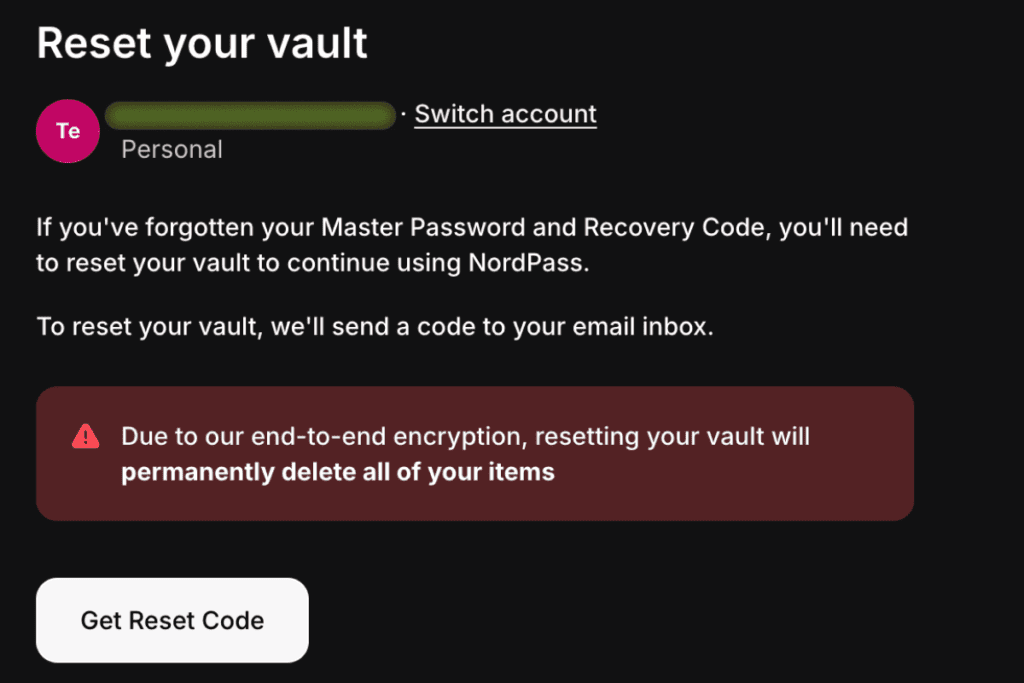
“Due to our end-to-end encryption, resetting your vault will permanently delete all of your items.” Every saved login would be gone, and every generated password would need resetting by hand on every site, which would be a real pain. Save the recovery code on day one, outside NordPass.
On the free plan, the exported CSV held every password, card number, and PIN in plain text, and NordPass warned about that before the download. The fingerprint unlock I set up on Free works inside the Chrome extension, through a passkey, in about three steps.
Are you convinced?
NordPass: Pros and Cons
Pros:
- A click each to generate and save a login and 3 to fill it, on Free
- Unlimited logins on Free, and a folder per client
- A Chrome spreadsheet imported every login with its web address and note, and export is free
- The fingerprint unlock works inside the Chrome extension
- Premium keeps you signed in on multiple devices
- Premium shares logins with four access levels, and Can autofill hides the password from the other person
- Premium’s Password Health, breach scanner, and email masks all worked, and the Authenticator opened
- Auto-renewal canceled in 2 clicks, with no retention offer
Cons:
- Free keeps one device signed in at a time
- Password Health and breach alerts are Premium only
- Sharing needs Premium, and the client needs a NordPass account
- A login with a file can’t be shared, and Share hides on it
- No sign-up on the website, and help sits near the bottom of Settings
- Lose the master password without the recovery code and the reset deletes every item
- The renewal is charged 14 days before the year ends
Who Should Upgrade to NordPass Premium?
Who it’s for
- Freelancers on one device who want a capable password manager for free
- Anyone moving logins out of a browser or a spreadsheet, with a folder per client
- Freelancers who switch between devices all day, on Premium
- Freelancers who hand logins to a client or a helper, on Premium
Who it’s not for
- Free users who work on more than one device at once
- Anyone who keeps files on the logins they share
- Clients who won’t make a NordPass account to receive a login
Free Alternatives to NordPass
All three have a free plan. I haven’t tested Bitwarden or LastPass yet, so their lines come from their own pages, read October 2026.
Proton Pass Free stayed signed in on both my devices at once and flagged weak passwords, both locked on NordPass Free, but keeps two vaults and no folders, as my Proton Pass review and comparison of the two show.
Bitwarden says its free plan works on unlimited devices and can share logins with one other Bitwarden user, the two walls NordPass Free puts up.
LastPass limits its free plan to one device type, which is a different line from NordPass’s one signed-in device at a time.
Frequently Asked Questions
Is NordPass free?
Yes, NordPass has a free plan with no time limit and no cap on saved logins, and in my test it covered the daily password work, folders, import, and export. The catch is one signed-in device at a time. Sharing, Password Health, and breach alerts need Premium.
Is NordPass included with NordVPN?
NordPass comes with some NordVPN plans, not all. NordVPN’s pricing page, read October 2026, lists a password manager on its Complete and Prime plans, not on Basic, but none of Nord’s current pages says whether that’s the full NordPass Premium. Bought on its own, Premium is the yearly plan in the pricing table above.
Does NordPass work offline?
Yes, on Premium the extension opened my vault with Wi-Fi off and copied a password. It asked for the master password, because the fingerprint button needs a connection. I didn’t test the free plan offline.
Can I get my money back from NordPass?
NordPass’s help page on its money-back policy, read October 2026, offers your money back within 30 days of your first purchase only, and not on a renewal unless local law says otherwise. You cancel within those 30 days and then contact support, because NordPass’s cancel page says canceling doesn’t by itself result in a refund. Refund terms can change and can differ by region, so read NordPass’s current terms before you subscribe.
Is there a NordPass Chrome extension?
Yes, and I ran the computer half of my test in it. The NordPass Chrome extension is where you make the free account; it filled my logins on websites, and the fingerprint unlock works inside it. I tested Chrome only, so NordPass on Firefox or another browser is not tested here.
Final Verdict: Is NordPass Worth It?
NordPass is worth it for a freelancer who works from one device. The free plan does the daily password work in a few clicks and keeps every client in a folder. Premium is the upgrade if you work on more than one device at once, or need to share logins with clients.
The one-device rule is the wall most free users will hit, and the password checks Proton Pass gives away are Premium here. On Premium, sharing works, but it skips any login with a file and asks your client to make an account.
FREE
Overall:
4.5 / 5
4.5 / 5
Ease of use
4 / 5
Value
4.5 / 5
Features
5 / 5
Support
PREMIUM
Overall:
5 / 5
4.5 / 5
Ease of use
5 / 5
Value
5 / 5
Features
5 / 5
Support
Evidence verified: October 2026.

By Jonas Moons, founder & reviewer
I test every tool on Clear-Cut Reviews myself. No ghostwriters, no faceless team. If a tool falls short, I say so, even when it earns me nothing.