Proton Pass vs NordPass 2026: Both Devices at Once, or Client Folders
Two password managers with free plans, for freelancers who keep their own logins and their clients’.
Bottom line: It’s a tie split by plan: Proton Pass has the better free plan because it keeps your phone and computer signed in together, and NordPass has the better paid plan because it’s easier to use day to day and cheaper in its first year.
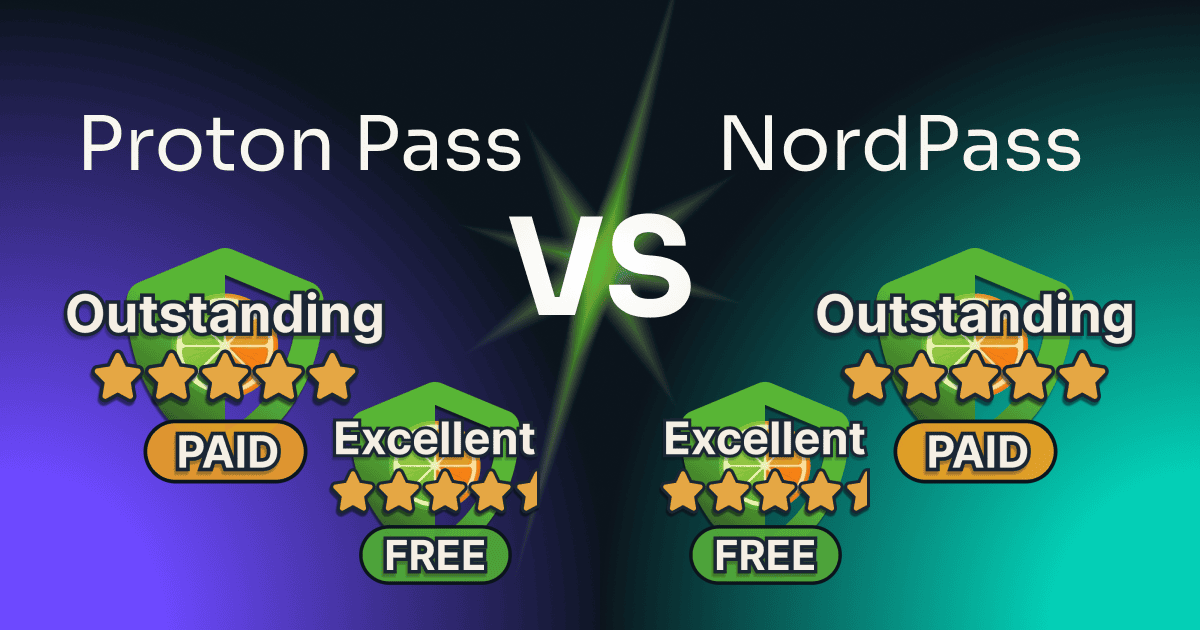
I ran this Proton Pass vs NordPass test on each tool’s free plan first, then paid for each upgrade on the same accounts. You’ll find out which free plan fits the way you work, and whether either paid plan earns its price.
Table of Contents
This post has no active affiliate links yet. No affiliate program can change my scores.
Quick Verdict
Overall: a tie
FREE
🏆 Proton Pass
two vaults, no folders
Overall:
4.5 / 5
FREE
NordPass
one signed-in device at a time
Overall:
4.5 / 5
PASS PLUS
Proton Pass
at $4.99/mo or $35.88/year
Overall:
5 / 5
PREMIUM
🏆 NordPass
at $23.88 the first year, then $35.88/year
Overall:
5 / 5
Proton Pass wins on:
- Free: your phone and computer signed in at once
- Free: weak and reused password alerts
- Plus: a secure link a client opens without an account
NordPass wins on:
- Free: a folder for every client
- Premium: a share that hides the password
- Fingerprint unlock inside the Chrome extension
What Are Proton Pass and NordPass?
Proton Pass is the password manager from Proton, the company behind Proton Mail and Proton VPN. It keeps logins, cards, and notes in vaults, generates and fills passwords, and makes hide-my-email aliases, forwarding addresses that keep your real email off a site’s records.
NordPass is the password manager from Nord Security, the company behind NordVPN. It keeps logins, cards, notes, and documents in one vault sorted into folders, and generates and fills passwords through a browser extension and phone apps.
Pricing
Both free plans are permanent, with no time limit. The difference is in how you pay: NordPass sells Premium by the year only, at a lower first-year price, while Pass Plus can be bought for a single month.
| Proton Pass | NordPass | Winner | |
|---|---|---|---|
| Paid plan, monthly | $4.99 (Pass Plus), or $2.99 a month billed yearly | $1.99 a month the first year, billed yearly only (Premium) | NordPass |
| Cost for a year | $35.88 on its yearly plan | $23.88 the first year, then $35.88 | NordPass |
| Smallest team plan | $1.99 a user a month, billed yearly, 3 users minimum | $1.99 a user a month, billed yearly, sold as a 10-user pack | Proton Pass |
NordPass costs less for the first year, and from the second year it renews at $35.88, the price of a year of Pass Plus today. Proton’s yearly checkout prints no renewal figure, only “Renewal pricing subject to change,” while its 2-year checkout says it then bills $35.88 every 12 months. For a team of three, Proton charges for three seats, while NordPass’s smallest team plan makes you buy ten.
For a household, Pass Family covers six people for $59.88 a year, and NordPass Family covers six for $44.28 the first year, then $71.88 a year. I didn’t test either family plan.
Prices in USD, read on each vendor’s US pricing page and checkout (28 September 2026, checked again 3 October 2026) and never converted. They vary by region, and the US checkouts added sales tax.
How I Tested Proton Pass and NordPass
I tested Proton Pass and NordPass on new accounts of my own, made with my tool-testing email address, each in its own Chrome profile. Both vaults got the same five made-up logins from a spreadsheet, a test card, a note, and a real Letterboxd sign-up made during the test, so no real password of mine or a client’s went in.
I ran each free plan first and photographed every wall, then paid on the same accounts out of my own pocket: a year of NordPass Premium and a month of Pass Plus. I tested in September and October 2026 on my computer and my phone, and for the receiving side of a NordPass share I made a second NordPass account on the free plan.
Not tested: the refund on either tool (I haven’t asked either for one), the family and business plans, Android and Windows, both free plans offline or with a passkey, and what the person invited to a Proton vault sees. I opened no support ticket on either, because a made-up question wastes an agent’s time, so support speed isn’t measured.
| What I measured | Proton Pass | NordPass | Plan |
|---|---|---|---|
| Sign-up to the open extension | about 6 min, recovery phrase saved | about 5 min 30 s, two passwords set | Free |
| Logins arrived from a five-row Chrome spreadsheet | 5 of 5, in about 1 min 30 s | 5 of 5, in about 1 min 16 s | Free |
| Clicks from an empty sign-in form to signed in | 3 | 3 | Free |
| Devices signed in at once | 2 of 2, computer and phone | 1 (the phone signed the computer out) | Free |
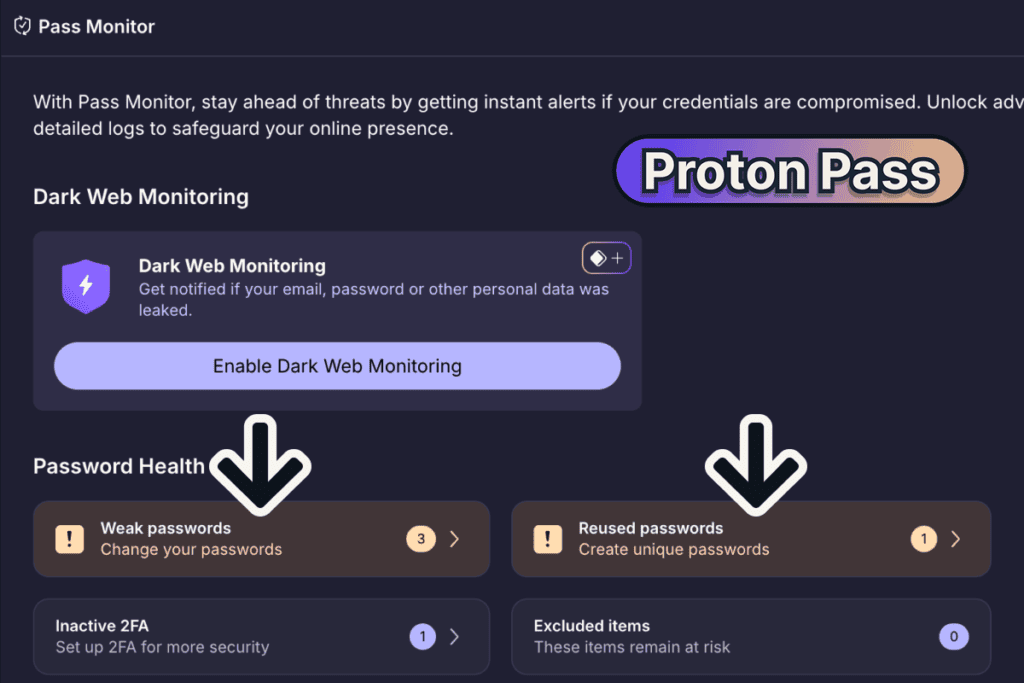
| Password alerts on the made-up logins | 3 weak, 1 reused | locked behind Premium | Free |
| Clicks from the extension to help | 2, to a “Report a problem” form | 2 and a scroll, to the help center | Free |
| A shared login opened by someone with no account | opened by secure link, file included | no: the email asks them to make a NordPass account | Pass Plus and Premium |
| Steps to cancel | 4 screens after Continue, no retention offer | 2 clicks, no retention offer | Pass Plus and Premium |
Proton Pass vs NordPass: The Scores
A free plan and a paid plan are different products, so each gets its own score, free against free and paid against paid.
Both pairings are the plans one person buys for themselves. Each tool also sells business plans with an admin panel, for three users or more on Proton and as a 10-user pack on NordPass’s smallest one; neither is tested or scored here.
Free vs free: Proton Pass, on the unrounded score
FREE
🏆 Proton Pass
Overall:
4.5 / 5
4 / 5
Ease of use
4.5 / 5
Value
5 / 5
Features
5 / 5
Support
FREE
NordPass
Overall:
4.5 / 5
4.5 / 5
Ease of use
4 / 5
Value
4.5 / 5
Features
5 / 5
Support
Both free plans publish 4.5, and before rounding it’s Proton Pass 4.625 against NordPass’s 4.5, or 18.5 points against 18. Proton Pass loses its half points to two vaults and no folders, to settings and the support chat that live on the website with no link from Pass, and to fingerprint unlock that works only in its Mac app. It wins on everything a free user does across devices: both stayed signed in, the password alerts are free, and a whole vault can be shared.
NordPass Free loses its points to one signed-in device at a time, locked password alerts, locked sharing, and a hunt for the sign-up and the help page. It stands out on structure, with every folder I made free, and the daily work happens in the browser without opening the vault.
Paid vs paid: NordPass, on the unrounded score
PASS PLUS
Proton Pass
Overall:
5 / 5
4 / 5
Ease of use
5 / 5
Value
5 / 5
Features
5 / 5
Support
PREMIUM
🏆 NordPass
Overall:
5 / 5
4.5 / 5
Ease of use
5 / 5
Value
5 / 5
Features
5 / 5
Support
Both paid plans publish 5, and before rounding it’s NordPass Premium 4.875 against Pass Plus’s 4.75, or 19.5 points against 19. Pass Plus’s Ease of use sits a full point under its 5, at 4, because Plus keeps both of the free plan’s faults: help and the dark web settings live on the website, and the fingerprint still works only in the Mac app. Everything else is full marks, from secure links that carry a file to emergency access, which opened on Plus.
NordPass Premium lost half a point only to Share hiding on a login with a file attached: it’s grayed out, with the reason only on hover. Every wall on the free plan opened, and its password check found three of my made-up passwords on the dark web.
Not deducted, but worth knowing: Proton Pass Plus
- Dark Web Monitoring didn’t watch my sign-in address, which isn’t a Proton address, until I added it by hand and entered an emailed code. It cost nothing, since it was watched once added; NordPass Premium named the address it watched from the start.
- A secure link shows the password to whoever opens it. No points off, because the link dies after the time and views you set; NordPass Premium’s Can autofill share kept the password hidden on my receiving account.
Not deducted, but worth knowing: NordPass Premium
- The person you share a login with must make a NordPass account first, though a free one is enough. No points off, because the login still reaches them; Pass Plus sends a link they open without an account.
- A login with a file attached can’t be shared, so the file comes off first. No points off, since few freelancers send a file with a login; Pass Plus shares the login and its file in one link.
- A share set to end after an hour kept working when it was accepted after that hour, until I removed it. An edge case, so no points off: a share accepted in time did end by itself.
Want to try them side by side?
Where Each Free Plan Stops
The free plans stop at opposite walls: Proton Pass at the number of vaults, NordPass at the number of devices. Which one you’ll hit first decides it for most readers.
Free on Proton
Premium on NordPass
Devices Signed In at Once (Winner: Proton Pass)
Proton Pass: every device stays signed in. I signed in on my iPhone while the Chrome extension on my computer stayed signed in, refreshed it to be sure, and the account’s session list showed both.

NordPass: one device at a time. Signing in on my phone signed the extension on my computer out. Signing the computer back in brought up “You are logged out from other devices,” with Upgrade to Premium beside Keep single device.
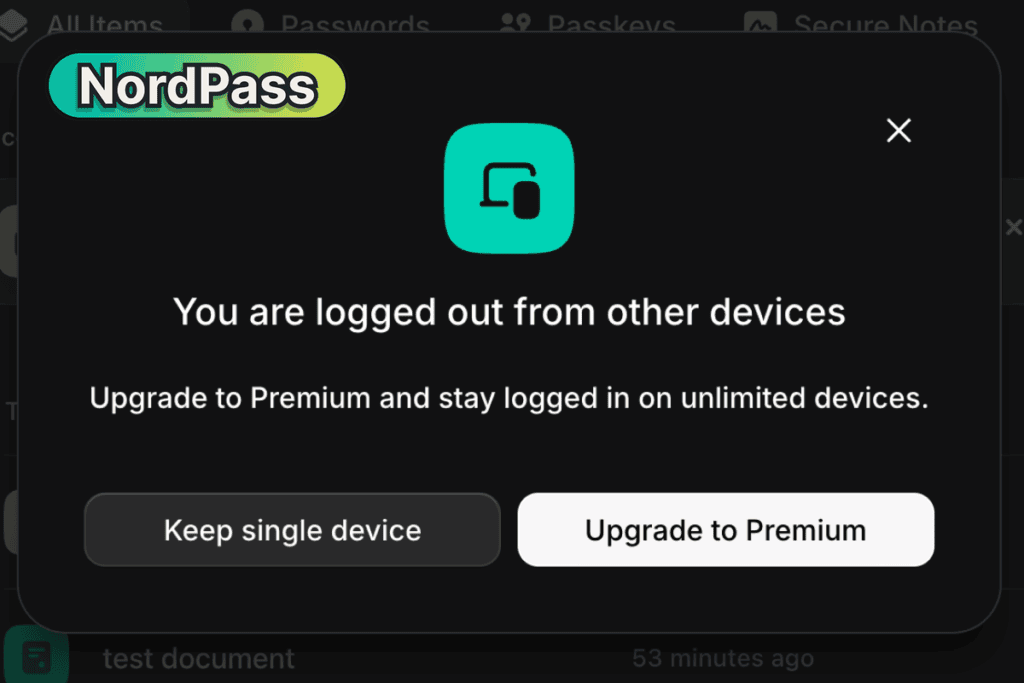
Winner: Proton Pass. If you check a client’s login on your phone between meetings, Proton’s free plan keeps your computer signed in, and NordPass’s makes you sign in again.
Free on both
Keeping Clients Apart (Winner: NordPass)
Proton Pass: two vaults, and no folders. I could keep two clients apart and no more. My third vault stopped at “You have reached the limit of vaults you can create.”

NordPass: a folder per client. I made ten folders on the free plan, Client A to Client J, and NordPass refused none of them.
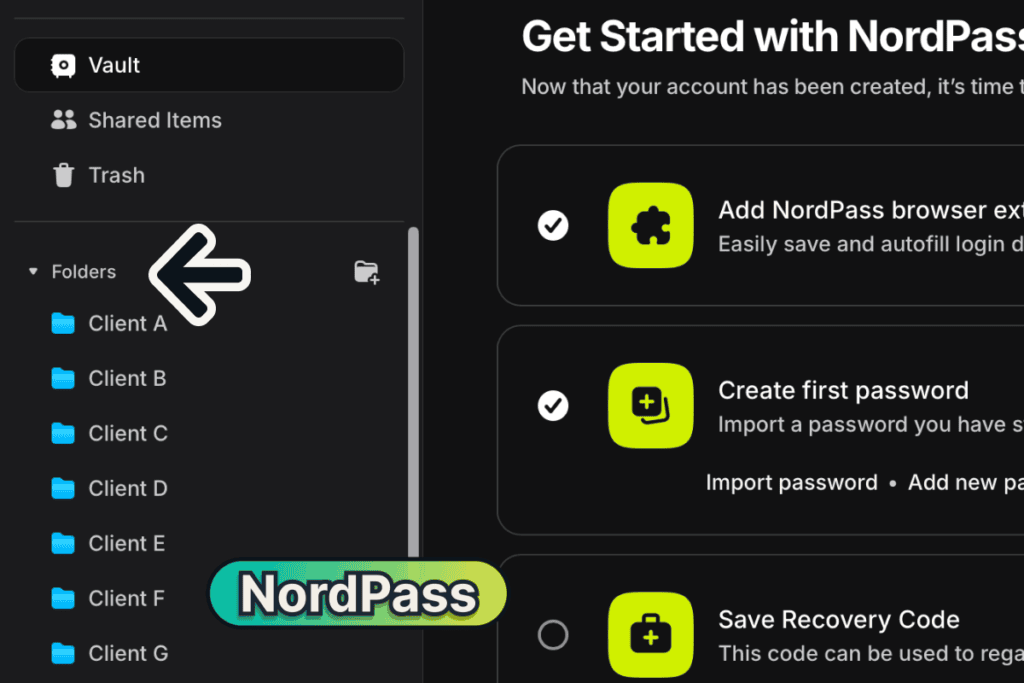
Winner: NordPass. A freelancer with a third client has nowhere of their own to put them on Proton’s free plan.
Free on both
Locking the Vault and Getting Back In (Winner: Split)
Proton Pass: open by default, but hard to lose. Out of the box, “Unlock with” is set to None (“Proton Pass will always be accessible”) on the free plan, and when I quit and reopened Chrome on Plus with the setting still on None, the extension opened straight into my vault. One setting fixes it (Settings, then Security, then a PIN code), and fingerprint unlock worked only once I installed Proton’s Mac app, never in Chrome.
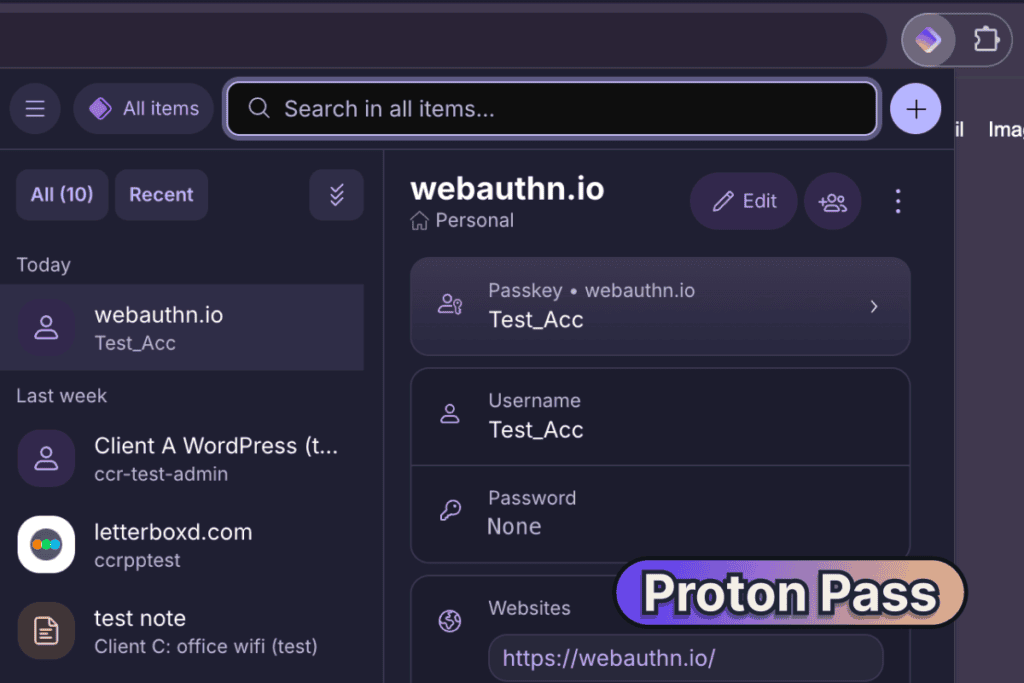
In return, Proton made me save a recovery phrase before I could finish signing up. Its help pages warn that a reset by email alone can leave your Pass items unreadable, and the phrase is what brings them back.
NordPass: locked every time, but easy to lose. After the same restart on Premium, NordPass asked for my fingerprint or master password, and the fingerprint unlock I had set up in the Chrome extension on the free plan worked. Its recovery code is offered and never required, and without it, resetting the vault says it will “permanently delete all of your items.”
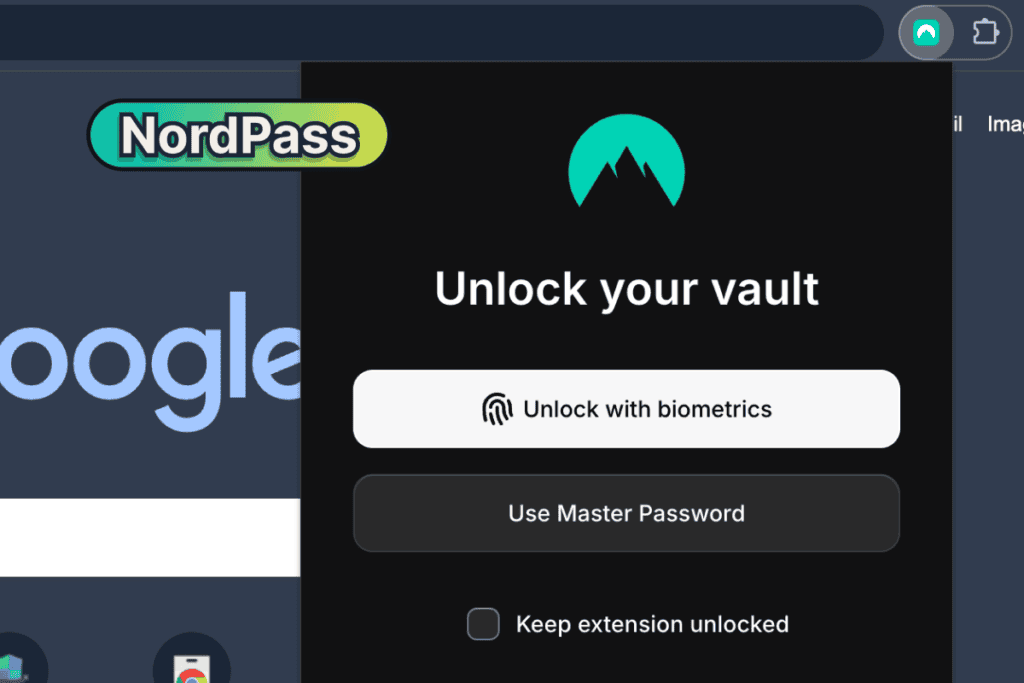
Winner: split. NordPass locks better out of the box, and Proton makes sure you can get back in. On either, do on day one what the tool doesn’t force, a PIN on Proton or a saved recovery code on NordPass.
Proton’s help pages on account recovery, read October 2026.
Free on Proton
Premium on NordPass
Sharing With a Client (Winner: Proton Pass)
Proton Pass: a whole vault, free. On the free plan I invited an address to a vault as a Viewer, with no upgrade wall at any step. Sharing a single login needs Plus, and what the invited person sees I didn’t test.
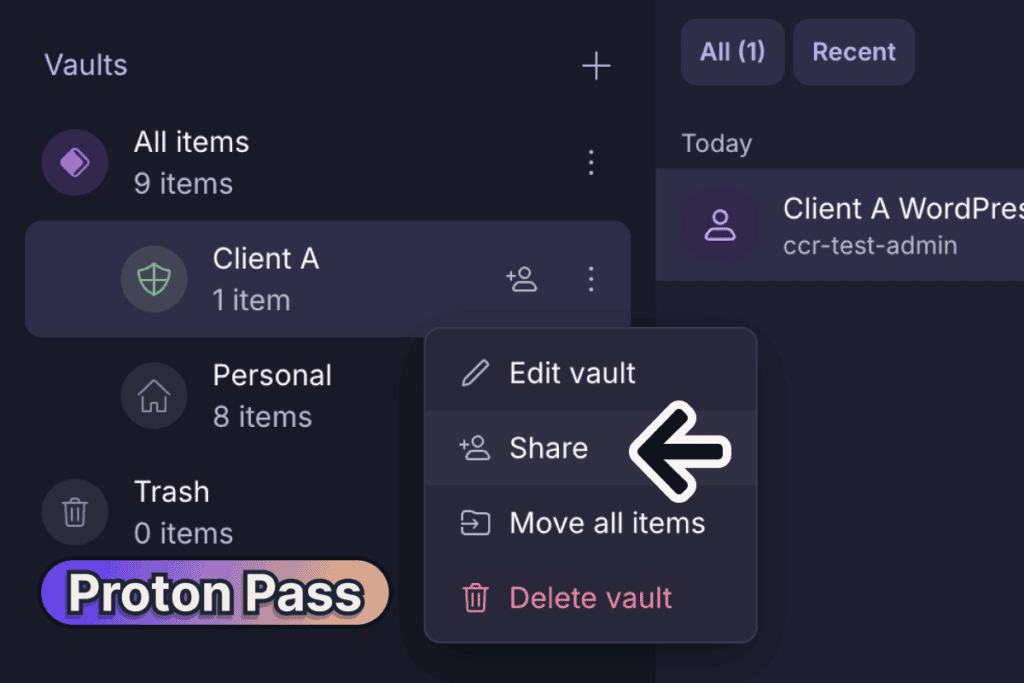
NordPass: locked. On the free plan, Share and Attach in a login’s menu both carry a crown, with a “Premium” label on hover.
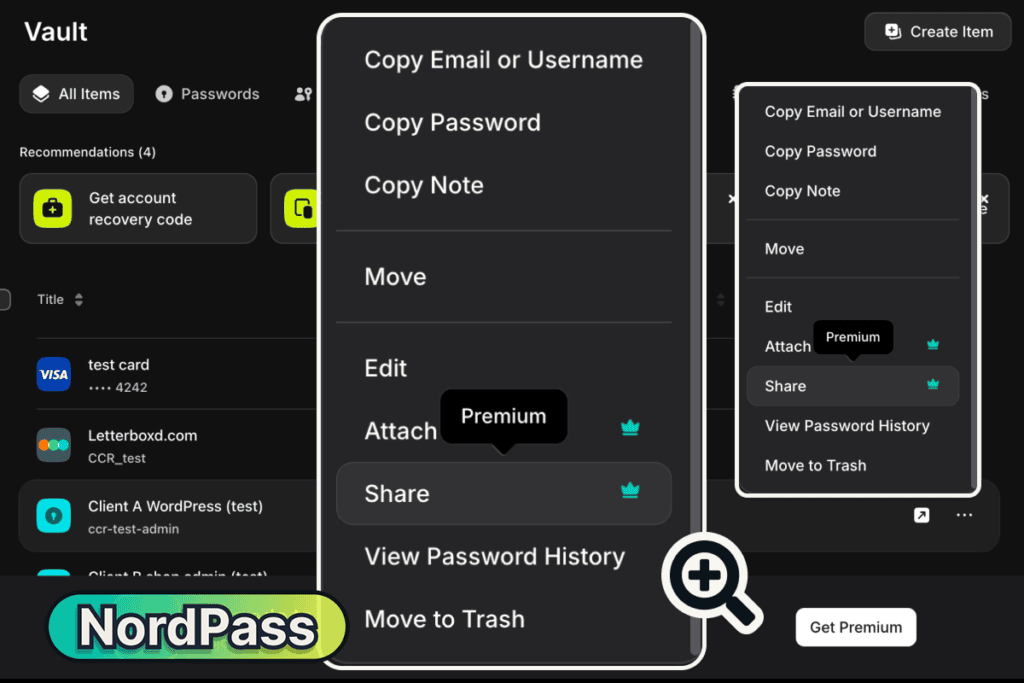
Winner: Proton Pass, the only free plan of the two that lets you give a client access at all.
Free on Proton
Premium on NordPass
Weak and Reused Password Alerts (Winner: Proton Pass)
Proton Pass: free. Pass Monitor flagged three of my made-up passwords as weak and one used on two logins, and each opened with a banner telling me to change it.
NordPass: Premium. Its free plan rates each password on its own (“Moderate Password”), but the Password Health page that finds weak and reused ones opens on “Upgrade to Premium. Uplevel your password security.”
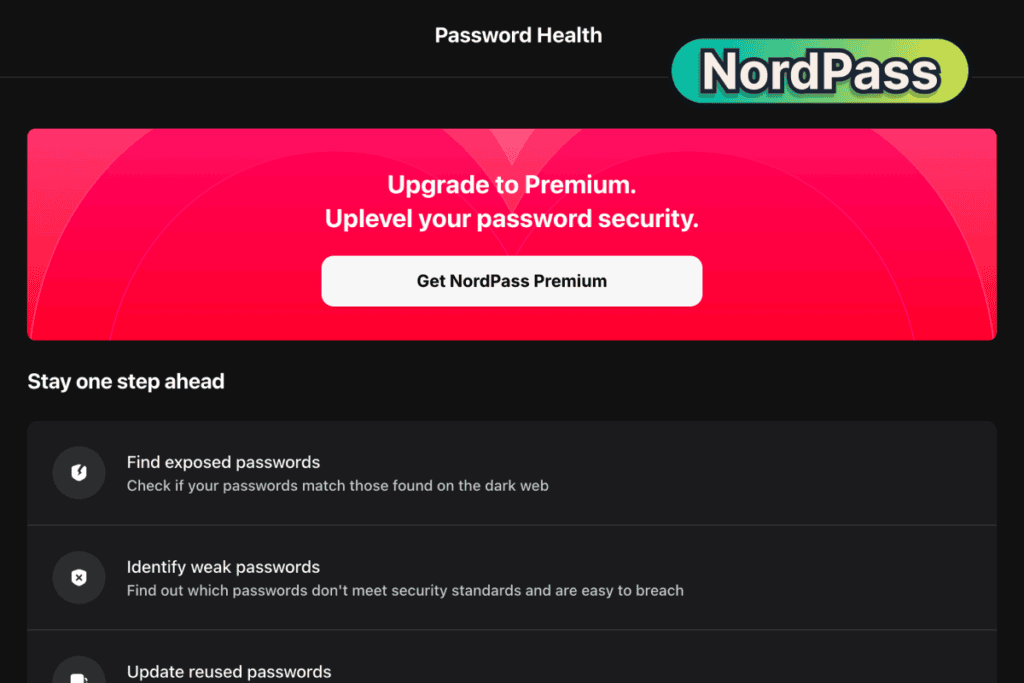
Winner: Proton Pass, which hands a free user the list of passwords to fix.
Is free enough for you?
How Each Tool Handles Its Paywalls
Proton Pass and NordPass mark most paid features before you click, so neither free plan lost an Ease of use point to a paywall. Two gave no warning until I clicked them (NordPass’s Give Access button for emergency access, and Proton’s “Enable Dark Web Monitoring” switch in its web account). They differ in how often they remind you.
NordPass reminds you all the time. A permanent “Upgrade to Premium” bar sits along the bottom of the vault with no way to close it, an upgrade pop-up appeared about ten seconds after my vault first opened, and crowns mark the locked tools in the menu. On a sign-up form, it even offers “Create email mask, Available with Premium” in the email box.
Proton Pass reminds you less, and more often at the moment you need it. Locked features carry a small Plus badge, the sign-up showed one “Special Offer!” pop-up, and the iPhone app opened on an upgrade screen with “Not now” at the top. Its walls appear when you try the thing, like the vault limit inside the vault editor, and its free hide-my-email alias sits in that same email box, one click away (step 1 of my guide to creating Proton Pass aliases).
The free Ease of use scores came from elsewhere: on Proton, help and settings that live only on the website, and on NordPass, a sign-up you can only start from the extension and help near the bottom of Settings.
What You Get When You Pay
Paid on both
Sharing a Login With a Client (Winner: Split)
Pass Plus: a link, no account needed. I made a secure link set to one hour and one view, then opened it in a private window with no Proton account. It showed the username, the password, the website, the note, and the attached file to download, and a second opening said only “Secure link does not exist.”
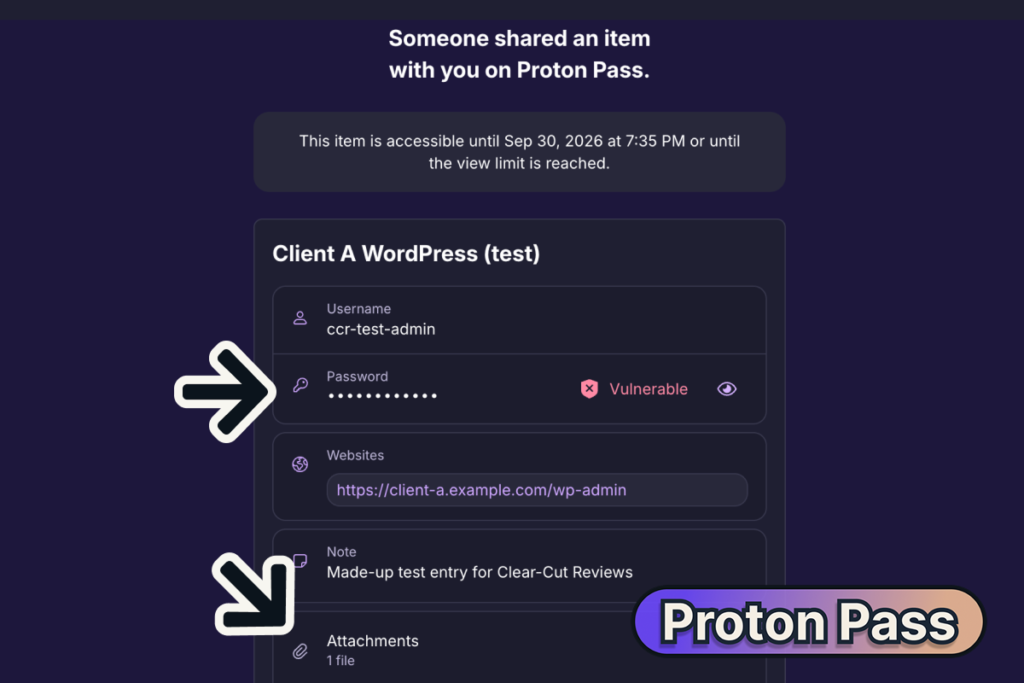
Inviting a person to one login is different: Proton refused my non-Proton address, “Only existing users can be invited to access an item.”
NordPass Premium: an account needed, but the password can stay hidden. The share email told my receiving address “To accept this item, create a NordPass account and download the app.” On the Can autofill level, my receiving free account saw only dots, and the eye and copy buttons both said “You don’t have permission for this action.”
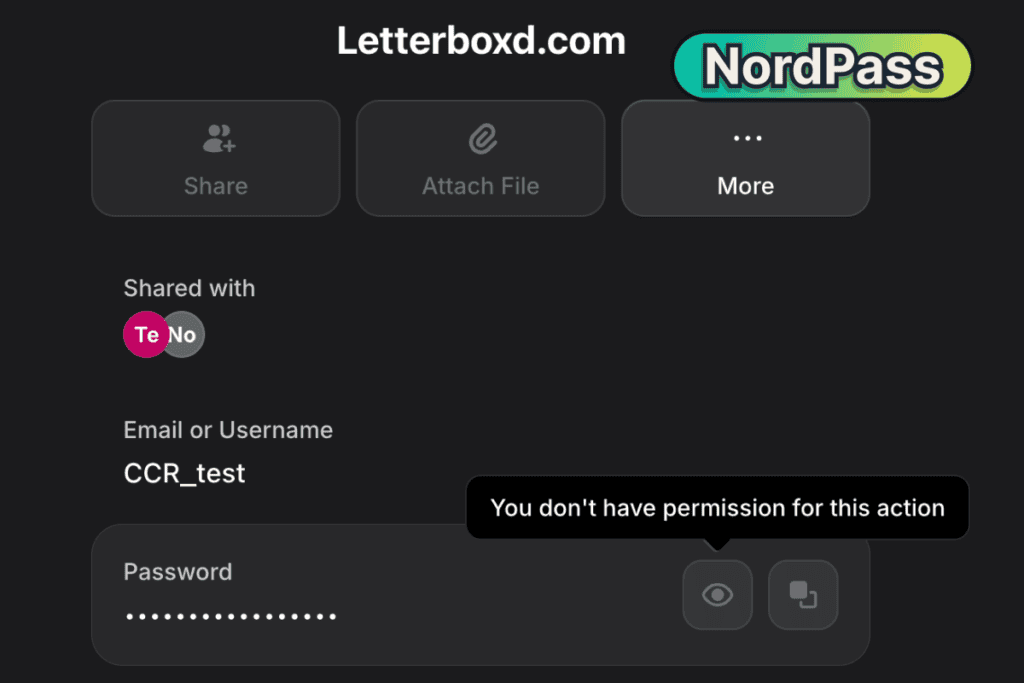
Ticking several logins in NordPass’s vault list brings up a Share icon for all of them, and taking a share back took four clicks. A login with a file attached can’t be shared at all (“Can’t share items with attachments”). Every click on both sides is in my guide to sharing passwords in NordPass.
Winner: split. Proton Pass for a client who has no account or needs the file too, and NordPass for a helper who should use a login without ever seeing the password.
Paid on both
Breach Checks (Winner: NordPass)
Pass Plus: it watched the wrong address. Dark Web Monitoring said “No breaches detected,” but it was watching only my one alias, not the non-Proton address I sign in with. Once I added that address by hand and entered an emailed code, it was watched too, while Proton’s own settings page still said support for non-Proton addresses “is coming soon.”

NordPass Premium: it named what it checked. After an opt-in that shares hashed passwords with an outside provider, Password Health found three of my made-up passwords on the dark web, one weak, and two reused. Its Data Breach Scanner showed the address it watched from the start.
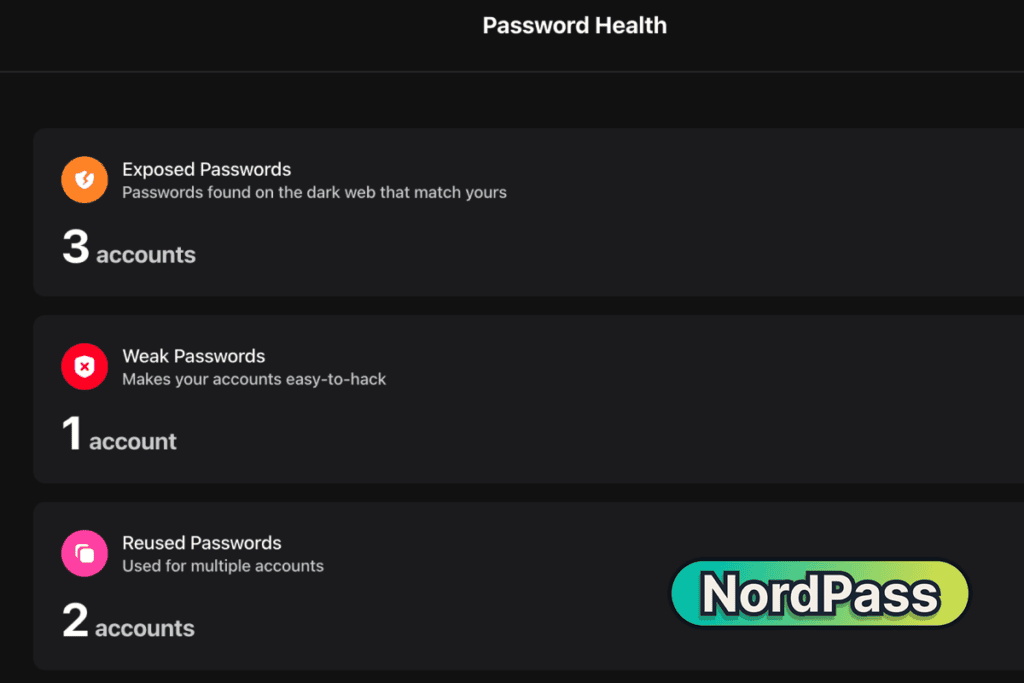
Winner: NordPass, because it checks your saved passwords as well as your address, and tells you which address it’s watching.
Paid on both
Two-Factor Codes (Winner: Proton Pass)
Pass Plus: paste the key and you’re done. I pasted a test key into a login under Edit, saved it, and a six-digit code with a 30-second countdown appeared at once, on my phone moments later.
NordPass Premium: three setup steps first. “+ Add Two-Factor Code” first asked me to set up the NordPass Authenticator, with a fingerprint scan through a passkey and then a setup code sent by email; I stopped before entering it.
Winner: Proton Pass, for the quicker start. Proton’s plan table puts two-factor codes on Plus, while its help page says the free plan keeps up to three.
Proton’s plan table and its help page on Pass plans, read October 2026.
Paid on both
Canceling and Asking for the Money Back (Winner: NordPass)
NordPass: two clicks. In Nord Account, Billing, I clicked Cancel and then “Cancel auto-renewal,” with no retention offer. NordPass’s subscription terms say the renewal is charged 14 days before the year ends, so cancel earlier than the end date.
Pass Plus: four screens, at the bottom of a page. The Cancel subscription box sits at the very bottom of the web account’s Subscription page, then four screens follow, also with no retention offer. Neither tool’s cancel screens mention the money-back guarantee.
Proton’s terms of service say you can cancel within 30 days of your first purchase for a full refund, once per user, asked for through its support form and processed within 30 days. NordPass’s help page on its money-back policy covers the first purchase only: cancel within 30 days, then contact support, and it gives no processing time. I haven’t asked either for a refund, so the steps after the request aren’t tested; refund terms can change and can differ by region, so read each vendor’s current terms before you subscribe.
Winner: NordPass, because canceling took two clicks where Proton took four screens at the bottom of a page.
Proton’s terms of service and NordPass’s help page on refunds, read October 2026; NordPass’s subscription terms, read September 2026.
Which one fits your work?
Who Should Choose Which
Proton Pass Free or NordPass Free?
FREE
Choose Proton Pass Free if:
- You work on a computer and a phone: the free plan kept both signed in.
- You want to know which of your passwords are weak or reused.
- You keep your real email off sign-up forms with hide-my-email aliases.
Choose NordPass Free if:
- You work from one computer and want a separate folder for every client.
- You unlock your vault many times a day: on the free plan, I made the browser extension open with one touch of my finger.
Pass Plus or NordPass Premium?
PASS PLUS
PREMIUM
Choose Pass Plus if:
- You have more than two clients to keep apart: Plus made my third vault.
- You send clients logins they open without an account, sometimes with a file attached.
- You want to pay month by month: NordPass sells Premium by the year only.
Choose NordPass Premium if:
- You share logins with a helper who should use them without seeing the password.
- You want the cheaper first paid year and a check of your saved passwords against known leaks.
- You want the extension to ask for your fingerprint or master password after Chrome restarts.
Final Verdict
Proton Pass and NordPass tie: Proton Pass has the better free plan, and NordPass has the better paid plan.
On the free plans, Proton Pass kept my phone and computer signed in together and listed the passwords I should change, two things NordPass charges for. Its catch is two vaults, so a third client has nowhere of their own.
On the paid plans NordPass wins by half a point of Ease of use: its fingerprint works in Chrome and its help is linked from the app. Proton’s answer is a link a client opens without an account, file included.
NordPass’s clearest win is structure on the free plan. If most of your work happens on one computer with many clients, its folders will keep you tidier than Proton’s two vaults.
If you switch between devices, start on Proton Pass Free; if you stay on one computer, start on NordPass Free.
For the full detail on either tool, see the Proton Pass review and the NordPass review.
Frequently Asked Questions
Is Proton Pass better than NordPass?
Proton Pass is better if you stay on a free plan, and NordPass is better if you pay. Both free plans score 4.5 and both paid plans score 5, and the unrounded scores put Proton Pass ahead on free and NordPass ahead on paid. Proton’s free plan keeps more than one device signed in, while NordPass Premium is easier to use day to day.
NordPass vs Proton Pass: which free plan is better?
Proton Pass’s, for most freelancers. Its free plan kept my phone and computer signed in together and flagged weak and reused passwords, while NordPass Free signs out your other device and keeps password alerts for Premium. NordPass Free is the better pick if you use a single computer and want a folder for every client, since Proton’s free plan stops at two vaults.
Is NordPass cheaper than Proton Pass?
For the first year, yes: NordPass Premium costs $23.88 against $35.88 for a year of Pass Plus. From the second year NordPass renews at $35.88 a year, while Proton’s yearly checkout shows no renewal figure, only “Renewal pricing subject to change.” NordPass sells no monthly plan, and Pass Plus costs $4.99 for a single month.
Can I share a password with a client who doesn’t use either app?
Yes, with Pass Plus: its secure link opened my login, and the file attached to it, in a browser with no Proton account, and stopped working after the one view I allowed. NordPass Premium asks the person to make a NordPass account first, though a free one is enough. Neither free plan shares a single login.
Can I use Proton Pass and NordPass on my phone and computer at the same time?
Proton Pass, yes, even on the free plan: my phone and computer stayed signed in together. NordPass only on Premium, because on the free plan signing in on my phone signed my computer out. Both synced my logins between the two devices.
Should I switch from NordPass to Proton Pass?
Only for a reason you’ll feel: switch if you’re on NordPass Free and need more than one device, or want free password alerts and aliases. Proton’s import screen lists NordPass by name, and NordPass’s lists Proton Pass, so moving either way starts from a menu. If you rely on folders for many clients or a share that hides the password, stay.
Evidence verified: October 2026.

By Jonas Moons, founder & reviewer
I test every tool on Clear-Cut Reviews myself. No ghostwriters, no faceless team. If a tool falls short, I say so, even when it earns me nothing.