
FreshBooks Review 2026: Branded Invoices and Reminders on Every Plan
FreshBooks is paid invoicing and bookkeeping software for freelancers and small businesses that bill their own clients.
Bottom line: Worth it for a freelancer with a handful of regular clients who wants invoices, reminders, and time billing that just work; skip Lite if you juggle more than five clients, and don’t buy Plus for receipt scanning, which filled in nothing in my test.
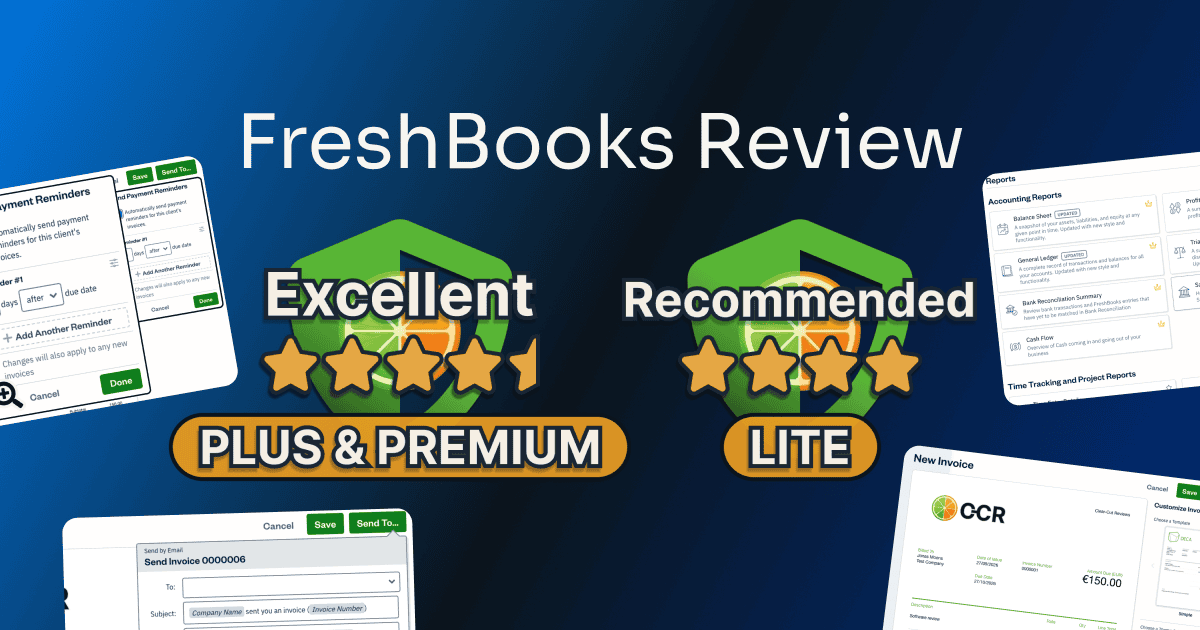
I ran one FreshBooks account through the free trial and all three plans you can buy (Lite, Plus, and Premium), using my own logo and receipts, with a second email address of mine as the client. Here’s where Lite stops, what the upgrades add, and the two features that didn’t do what FreshBooks sells them for.
Table of Contents
This post has no active affiliate links yet. No affiliate program can change my scores.
Quick Verdict
LITE
Total Score:
4 / 5
at $23/mo · 5 billable clients
PLUS
Total Score:
4.5 / 5
at $43/mo · 50 billable clients
PREMIUM
Total Score:
4.5 / 5
at $70/mo · unlimited clients
30-day free trial on every plan, no card needed.
Pros:
- Invoices keep your logo, color, and currency
- Reminders, late fees, deposits on every plan
- Tracked time becomes a correct invoice line
Cons:
- Lite: only five clients, archived ones included
- Plus and up: receipt capture left fields empty
Best for:
- Lite: freelancers with a few regular clients
- Plus: an accountant who works in your books
- Premium: paying suppliers, several projects
Not for:
- More than five clients on Lite
- Books kept in two currencies, on any plan
What Is FreshBooks?
FreshBooks is cloud invoicing and bookkeeping software for freelancers and small service businesses, sold by 2ndSite Inc., which trades as FreshBooks. It’s used for sending invoices, tracking time and expenses, and getting paid, from the first invoice to the reports you hand over at tax time.
On a computer FreshBooks runs in the browser: its pricing page says every feature is web-based, and none of its pages offers a desktop or Mac app. The FreshBooks app is for iPhone, iPad, and Android, and I used the iPhone one for receipts.
FreshBooks’ pricing and mobile apps pages, read October 2026.
FreshBooks Pricing: How Much Does FreshBooks Cost?
FreshBooks has no free plan, only a 30-day free trial that needs no card. Don’t judge a plan by the trial, though, because it locked the invoice email message that Lite lets you edit.
| Plan | Lite | Plus | Premium |
|---|---|---|---|
| Price | $23/month | $43/month | $70/month |
| Billable clients (archived ones count) | 5 | 50 | Unlimited |
| Everyday invoicing tools ¹ | |||
| Proposals with e-signature | |||
| Client retainers | |||
| Accountant access | |||
| Bank reconciliation | |||
| Balance Sheet, General Ledger, and other accounting reports | |||
| Automatic receipt data capture ² | |||
| Email templates with dynamic fields | |||
| Supplier bills and accounts payable | |||
| Automatic bill data capture ² | |||
| Project profitability | |||
| Team members (add-on) | $11/month per person | $11/month per person | $11/month per person |
| Advanced Payments (add-on) | $20/month | $20/month | $20/month |
| Card payment fee, FreshBooks Payments (US) | 2.9% + $0.30 | 2.9% + $0.30 | 2.9% + $0.30 |
| Bank transfer (ACH) fee, FreshBooks Payments (US) | 1% | 1% | 1% |
¹ Everyday invoicing tools
- Unlimited invoices and estimates
- Recurring invoices
- Automatic payment reminders
- Late fees
- Deposits and payment schedules
- A client portal
- Time tracking
- Unlimited expenses
- The Profit and Loss and sales tax reports
- Online card and bank payments, once a payment service is connected
² Neither filled in a single field in my test (Receipt Capture, below).
Select, the fourth plan, adds two team member accounts, lower card fees, and its own support and onboarding, by custom quote only (“Let’s Talk” on the pricing page). It isn’t tested here.
With five clients or fewer, counting archived ones, Lite’s $23 a month covers every everyday tool in the table; a sixth means deleting a client or paying $20 a month more for Plus. Paying yearly takes 10% off, by FreshBooks’ own plan cards. The US page also showed new-customer offers, with no end date printed (Lite at $1 a month for the first year, and Plus and Premium at 80% off for three months, at $8.60 and $14 a month), which can’t be combined with the free trial.
Prices in USD from FreshBooks’ US pricing page, read 25 September 2026; they vary by region. My Spanish account was shown its plans in US dollars too, under the note “Features vary by region”. The two payment fee rows come from FreshBooks’ US fee table, read 11 October 2026.
Buying, Changing Plan, and Canceling
Buying during the trial costs nothing on the day. The checkout read “Your card won’t be charged until after your trial ends in 29 days”, and moving up to Plus and Premium charged nothing either. But the billing page never shows the charge date or the amount, so count it yourself: the first charge lands 30 days after the trial started, for whichever plan you hold that day.
Canceling is far harder to find: a small text link, “Cancel Your Account”, at the very bottom of the profile page, not a button. Three screens in, with a survey still to come, the last one warns that you’ll “lose access to your trial features immediately”, so cancel near the trial’s end if you only want to avoid the first charge. Your data is kept. Moving down is easy: Premium dropped straight to Lite in one step, with no warning about what stops working.
FreshBooks’ US pricing page offers a 30-day money-back guarantee on a purchase, which I didn’t use, while its terms of service call subscription fees non-refundable and cap any refund or credit at three months’ fees (both read October 2026). Refund terms can change and can differ by region, so read FreshBooks’ current terms before you subscribe.
Interested?
How I Tested FreshBooks
I tested FreshBooks on one account of my own, with Clear-Cut Reviews as the business, my own logo, banner, and receipts, and a second email address of mine playing the client. No sample data, and the account started on the free trial.
On the second day I bought Lite on the same account, then moved it up to Plus and Premium that evening, testing only what each plan adds; nothing was charged inside the trial. The testing ran in September 2026, on my computer and my phone, with my invoices in euros and with VAT.
What I didn’t test: a real bank or payment service, since my own accounts stayed out of it (reconciliation stops at the bank’s login screen, card payments at Stripe’s connect screen); payroll, filing taxes through FreshBooks, team members (a paid add-on), the Select plan, or Plus’s 50-client limit in practice. No support ticket either, because a made-up question wastes an agent’s time, so support speed isn’t measured.
| What I measured | Result | Plan |
|---|---|---|
| Guided tour’s first click to a finished, branded invoice | 6 min 30 s | Trial |
| 30 minutes tracked on an hourly project at €50 | one invoice line, 0.5 hours, €25 | Trial |
| A 90-dollar software expense, as counted in the euro Profit and Loss | €0.00 | Trial |
| Fields filled in from a clear supermarket receipt by receipt capture | none (shop and total empty, date left at today) | Plus |
| A sixth client saved on a five-client plan | no client saved, the form came back empty | Lite |
| Crowns, locks, and promo cards in about ten minutes of normal use | 12, none blocking an everyday job | Lite |
| Screens to the last one before a cancel is confirmed | 3, with a survey promised after | Lite |
| Ways to reach a person, in FreshBot’s answer | email, with a callback on request; no hours given | Trial, Lite, Plus, Premium |
Is FreshBooks Worth It? Score Breakdown
I scored all three plans you can buy. Lite has its own card; Plus and Premium share every score, so they share one.
LITE
Overall:
4 / 5
Five clients is a tight ceiling for its price, and two quiet traps cost you work. The everyday billing runs smoothly.
4 / 5
Ease of use
An expense entered in another currency silently drops out of the euro reports, and on Lite a sixth client is thrown away after you type it. Past those two, a branded invoice took me six and a half minutes.
3.5 / 5
Value
Lite’s monthly fee buys five billable clients, archived ones included, while Zoho Invoice’s free plan lists Lite’s best jobs too, Wave’s some of them, and neither prints a client limit. In return the whole everyday billing kit is in, with no upgrade prompt in its way.
4 / 5
Features
Receipts are typed by hand, and accountant access and the bookkeeping reports are Plus. Everything else on Lite, from invoicing to time tracking, expenses, and VAT, worked in my test.
5 / 5
Support
FreshBot, its AI assistant, says the route to a human is email, with a phone callback if you ask for one. FreshBooks has no public user community, which costs nothing when a person is a message away.
PLUS
PREMIUM
Overall:
4.5 / 5
Half a point goes: capture that left my receipt and bill blank costs half of it, the currency trap and the free rivals the rest. The client limit lifts and the accountant’s side of the books opens.
4.5 / 5
Ease of use
Expenses in a second currency still drop out of the reports on every plan. The sixth-client trap goes, since Plus allows 50 clients and Premium has no limit.
4 / 5
Value
Zoho Invoice’s free plan, and in part Wave’s, still list the everyday invoicing jobs, and the receipt reading Plus leads with did nothing in my test, while Wave sells it for less. The full point Lite lost to five clients comes back on Plus and Premium.
4.5 / 5
Features
Receipt capture on Plus and bill capture on Premium still left every document for me to type. Accountant access and the bookkeeping reports open on Plus, and Premium’s bills and email templates worked.
5 / 5
Support
Same as Lite, and FreshBot’s answer matched word for word.
Not deducted, but worth knowing
- On the trial, a client who wanted to message me through an invoice had to make a FreshBooks account first. No points off, because they can still view and download it without one, and reply by email.
On the Support score. The ? icon in the top bar opens a support panel, and its “Ask Us” button starts FreshBot. On the trial it answered my request for a real person with “Absolutely. Before I connect you with a human agent, what would you like help with in FreshBooks?” Asked for channels and hours, it gave the same answer on the trial, Lite, Plus, and Premium: “Currently, the only way to contact support is by email. If you’d like a callback, include your phone number and best times to reach you in your message.” No live chat, no number to dial, and no hours; a phone call only comes as a callback you ask for by email. Trustpilot, which rates FreshBooks the company rather than the invoicing product, carries mostly complaints about payments, cancellation, and charges, not about agents (read September 2026).
Fits the way you bill?
Key Features of FreshBooks
Every plan
Invoices: Fully Branded in Six and a Half Minutes
The invoice editor, the part you’ll use every week, is the strongest thing in FreshBooks. On the trial my first real invoice took 6 minutes 30 seconds from the guided tour’s first click, mostly spent choosing a color. I found three FreshBooks invoice templates (Simple, Modern, and Classic), and Modern takes a banner picture of your own. The logo was a drag and drop, the color picker took my exact lime hex code, the currency set itself to euros, and the second invoice remembered it all.
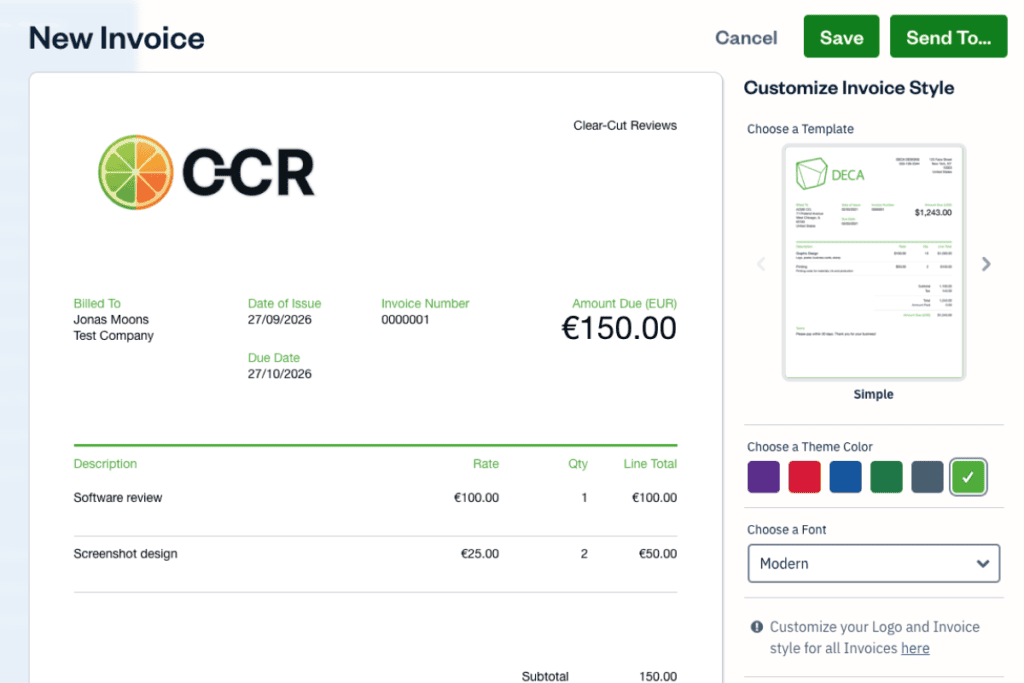
Check two things before your first send: the phone number FreshBooks makes compulsory at sign-up prints under your business name on every template, and client replies go to your sign-up email address.
Your client can view, print, and download the invoice without an account, but messaging you means creating a FreshBooks account and ticking a box that accepts FreshBooks’ Terms of Service and Privacy Policy (I saw that tick box but didn’t read the terms). There’s no pay button until you connect a payment service, and FreshBooks offered only Stripe on my Spanish account; I stopped at its connect screen.
Every plan
Getting Paid: Reminders, Late Fees, and Deposits Without an Upgrade
The tools for chasing money are on every plan, and setting them up on the trial showed no crown or upgrade prompt. Automatic payment reminders are set per client, the first at 3 days after the due date by default, with as many more as you add. Late fees can be a percentage of the invoice or of what’s still owed, or a flat fee, 30 days after the due date by default.
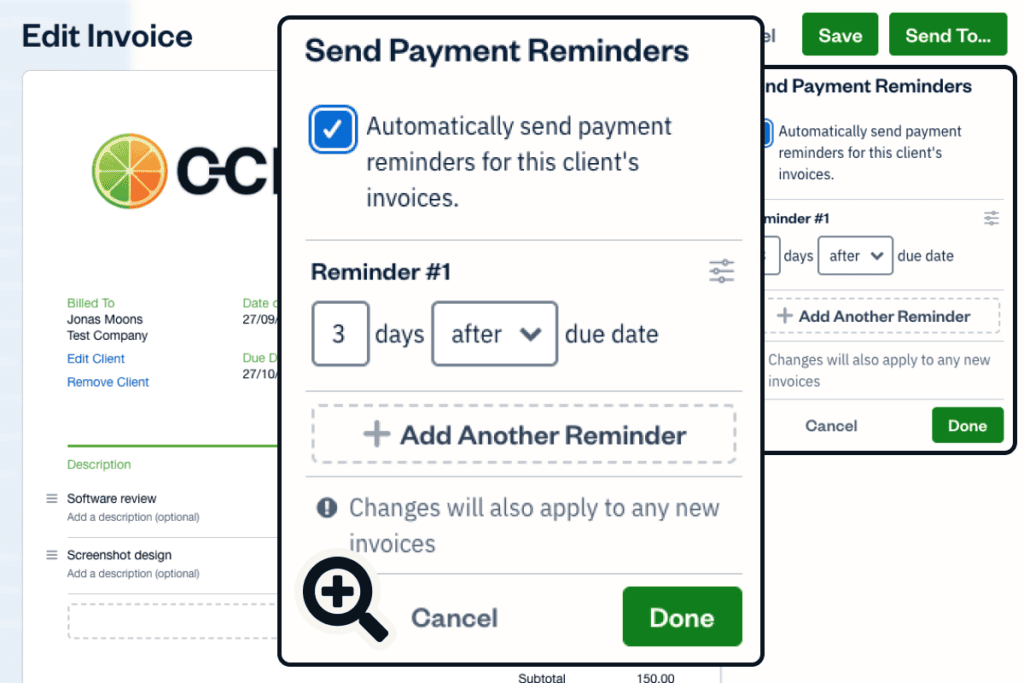
An estimate converts to an invoice with the same logo and colors. Deposits live on the invoice, not the estimate, and can be a percentage or a flat amount; a payment schedule splits an invoice into installments with their own due dates. Recurring invoices send themselves, and the start date defaults to today, so my first one went out the moment I saved it. The invoice list marks each one Draft, Sent, or Viewed, so you see when a client has opened it.
Every plan
Time Tracking: From a Timer to an Invoice Line
FreshBooks’ time tracker takes a running timer or hours typed in by hand, against a client or a project, and turns unbilled time into invoice lines. On the trial, 30 minutes on an hourly project at €50 an hour became one clean line, “Time (FreshBooks review)”, 0.5 hours, €25, with my name and the date.

Getting there had two one-off bumps. The new project form hid the hourly rate in a side panel at €0.00, the first screen in the test that didn’t explain itself, and I had no idea where to set the rate. And the first time I billed time, FreshBooks asked for a “standard rate” the project already had, then used the project’s rate anyway. After that it was smooth, on Lite too.
Every plan
Expenses, VAT, and the Currency Trap
FreshBooks handles expenses and VAT well, as long as everything is in one currency. On the trial I entered a 90-dollar software bill with 21% VAT, and FreshBooks worked the tax out backwards from the total (74.38 plus 15.62). The Sales Tax Summary then showed the VAT I’d billed, with a line for subtracting VAT on expenses: the sum a European freelancer needs for a VAT return, under a US name (“Sales Tax”).
That 90-dollar expense counted nowhere. The euro Profit and Loss read “Expenses €0.00”, and the tax report subtracted nothing. Each report shows one currency at a time, chosen behind its Filter button, converts nothing, and never says what it left out. Switched to US dollars, the same report showed the expense and none of the invoices.
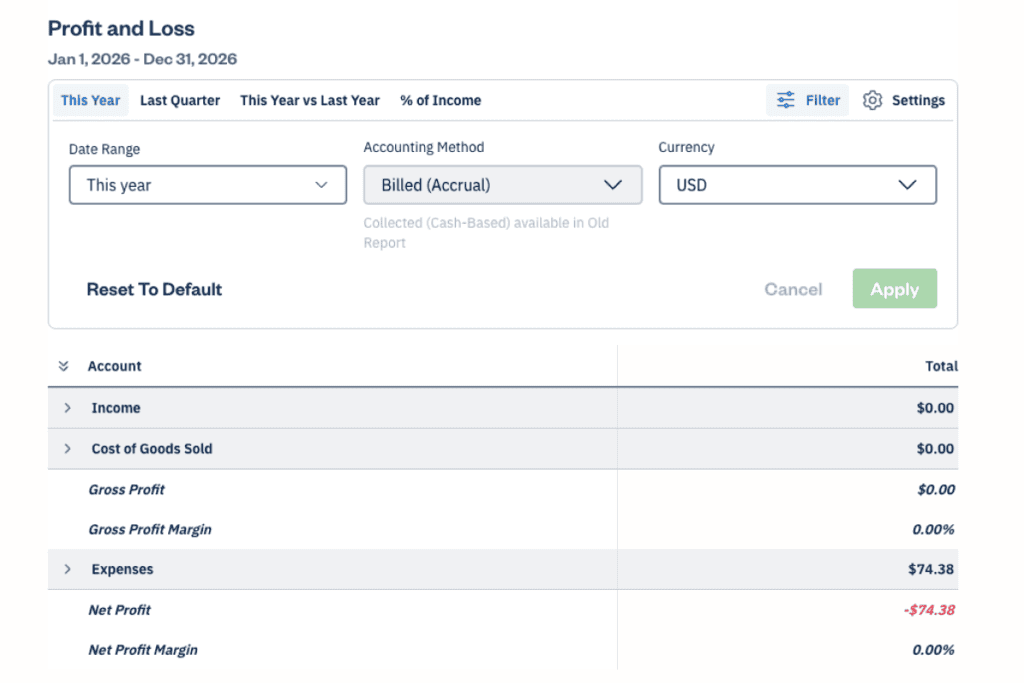
So if you pay for software in dollars and bill in euros, enter each expense in euros, at what your bank charged, or your profit and VAT come out wrong. Lite’s report did the same, and it counts invoices when you send them, not when you’re paid.
Plus and up
Receipt Capture: Sold on Plus, Empty in My Test
The Plus plan card leads with automatic receipt capture (“Automatically Capture Receipt Data”). On a paid Plus account I attached a real supermarket receipt to a new expense, in the iPhone app and in the browser. The shop and the amount stayed empty and the date sat at today’s default, though the receipt was clear and flat with the total in large print. The trial had done the same: no name, no prices, nothing, and nothing I could click to make it work. The picture below is that trial expense, and I typed its shop name and category in by hand.

Premium’s bill capture did no better. A PDF invoice attached to a new supplier bill left the amount and category empty, and I found no scan option on that screen.
All of this rests on one receipt, printed in Catalan, on a Spanish account, and one PDF; an English or US receipt, or emailing receipts in (a Plus feature), might fare better, and I didn’t test either. Lite has no capture at all, though attaching the image works on every plan and all receipts export in one go for your accountant.
Every plan
Clients: Five on Lite, and the Sixth One Vanishes
FreshBooks limits Lite to five billable clients, archived ones included, and it was the wall I hit hardest. With six clients from the trial on the account, the Lite card had no Upgrade button, only “Heads up! You’ve outgrown this plan.” Lite can’t be bought until you’re down to five.
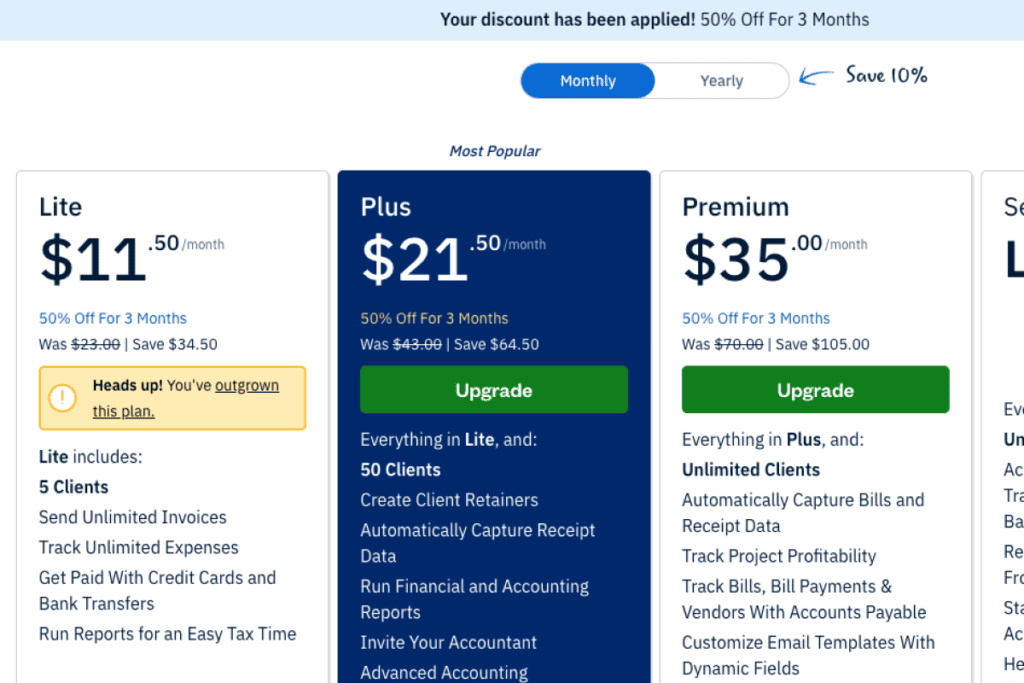
Deleting a client is the way through, and gentler than it sounds: on the trial, the delete warning never mentioned the client’s invoice, draft or sent, yet the sent invoice stayed in the list and in the money owed. Adding a sixth client once you’re on Lite is worse. I filled in the form, pressed Save, and only then got a pop-up with a green tick reading “Your account will be upgraded after your free trial ends.” After Close, the form was empty and no client existed. It never names the five-client limit, and what you typed is gone.
Plus and up
Plus: The Accountant’s Side of the Books, and Proposals
Plus is where FreshBooks turns from invoicing into bookkeeping. On Lite, five accounting reports carried a crown, Balance Sheet and General Ledger among them, while Profit and Loss and the Sales Tax Summary stayed open. On Plus, Balance Sheet and General Ledger opened, though my account held too few figures to judge whether they read clearly without an accountant.

Plus also opens FreshBooks’ accountant access, with two accountant roles marked FREE, and bank reconciliation; connecting a bank went through Plaid’s consent screen to a list of Spanish banks in about three steps, where I stopped at the login.
Proposals with e-signature are the other Plus line. The client types their name, ticks that it’s legally binding, and reads “By confirming, you agree to the Terms of Service”, which are FreshBooks’ own (I saw that line but didn’t read the terms, and stopped before signing). On Lite, Proposal carries a crown and the Retainers link did nothing, while on Plus I sent a proposal and the Retainers page opened.
Premium and up
Premium: Email Templates, Bills, and Project Profitability
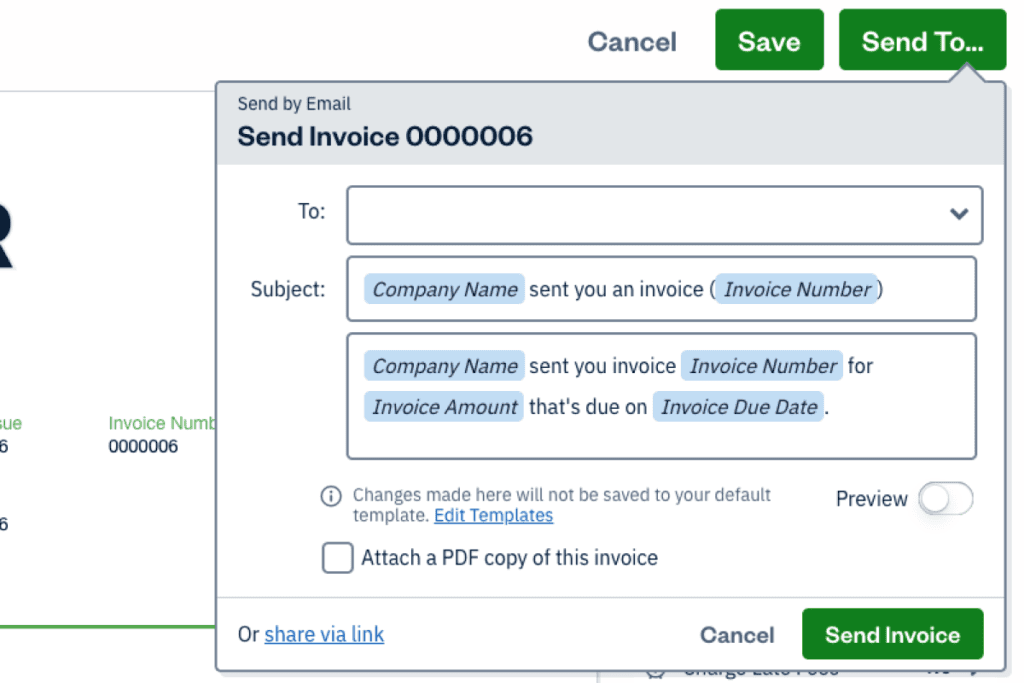
Premium adds three things a solo freelancer rarely needs, and all three worked in my test. Email templates with dynamic fields fill in your company name, the invoice number, the amount, and the due date by themselves, and Settings hold seven editable templates, the payment reminder among them.
Supplier bills and the Accounts Payable Aging report worked once I typed each bill in, and each project gains a Profitability tab, which my test project had too few figures to show properly. For a freelancer billing a few clients, Premium mainly buys unlimited clients over Plus.
Are you convinced?
FreshBooks: Pros and Cons
Pros:
- A branded first invoice, remembered for the next one
- Reminders, late fees, and deposits on every plan, with no upgrade prompt
- Tracked time becomes a correct invoice line
- VAT on invoices, and split out of expense totals
- Deleting a client keeps its invoices and what it owes
- Plus brings free accountant access, bank reconciliation, Balance Sheet, and General Ledger, all locked on Lite
- Help is one click from the top bar, and FreshBot says a person answers by email, with a callback on request
Cons:
- Lite allows five billable clients and won’t sell you Lite while you hold six
- A sixth client on Lite is thrown away after you type it
- An expense in another currency silently drops out of the Profit and Loss and the VAT report
- Receipt and bill capture, sold on Plus and Premium, filled in nothing
- FreshBot’s “Absolutely” to a human turns out to mean an email, and there’s no public user community to search
- Canceling takes a small link at the foot of the profile page and at least four steps, and ends trial features at once
Who Should Use FreshBooks?
Who it’s for
- Self-employed freelancers with five clients or fewer, counting archived ones, on Lite
- Consultants and designers who bill by the hour
- Small businesses that work with an accountant, on Plus
- European freelancers who charge VAT and keep every expense in their own currency
Who it’s not for
- Anyone with more than five clients who doesn’t want Plus’s price
- Anyone who pays bills in one currency, bills clients in another, and wants one set of books
- Anyone buying Plus for receipt scanning, which did nothing in my test
Free Alternatives to FreshBooks
FreshBooks has no free plan; the two tools I’m testing against it next both have one.
Wave is the closest match, with a free Starter plan that has no time limit and receipt reading on its paid Pro plan or as a Starter add-on.
Zoho Invoice is free, with one plan only, and lists recurring invoices, payment reminders, and time tracking on it; its help pages say it invoices in your base currency only.
QuickBooks has a free plan too, for one user and without accountant access. I haven’t tested it yet.
Wave’s and QuickBooks’ pricing pages and Zoho Invoice’s help pages, read September 2026.
Frequently Asked Questions
How much does FreshBooks cost?
FreshBooks’ monthly cost is $23 for Lite, $43 for Plus, and $70 for Premium, in US dollars on its US pricing page in September 2026, and Select is a custom quote. Paying yearly takes 10% off, and each team member is an $11 monthly add-on on any plan; prices vary by region, so check from your own country.
Does FreshBooks have a free plan or a free trial?
FreshBooks has no free plan, only a 30-day free trial that asked for no card when I signed up. It isn’t a full preview, since mine locked the invoice email message, which even Lite opens. For invoicing that costs nothing, Wave and Zoho Invoice both have free plans.
How do I cancel FreshBooks, and can I get a refund?
Use “Cancel Your Account”, a small text link at the very bottom of your profile page, not in Billing; canceling during the trial ends the trial features at once. After you’ve paid, FreshBooks’ US pricing page offers a 30-day money-back guarantee, which I didn’t test, while its terms of service call subscription fees non-refundable and cap any refund or credit at three months’ fees (both read October 2026). Refund terms can change and can differ by region, so read FreshBooks’ current terms before you subscribe.
What fees does FreshBooks charge when clients pay?
When a client pays an invoice online through FreshBooks Payments, FreshBooks takes a fee before the money reaches you: in its US fee table, 2.9% + $0.30 for a standard credit or debit card and 1% for a bank transfer (ACH), with more for business cards and American Express. The Select plan is promised lower card fees and capped bank transfer fees, but FreshBooks prints no figure for either. I didn’t connect a payment service, so I paid none of these (FreshBooks’ pricing page and its help article on US transaction fees, read October 2026). Fees differ by region, so check the table for your own country before your first paid invoice.
Can I import my data from another tool?
Expenses, yes: “Import From a File” takes a CSV, such as a bank export, with at least an amount, a date, and a description, and it turned my receipt PDFs away. I didn’t test bringing clients or invoices over. FreshBooks’ plan table lists its “Easy Switch” data migration on Select only, the custom-quote plan (read October 2026).
Is FreshBooks safe to use?
I didn’t test FreshBooks’ security, so this is only what my own account showed. Bank connections go through Plaid, whose consent screen names what it retrieves and for how long, and canceling keeps your data. A client who signs a proposal or messages you through FreshBooks also accepts FreshBooks’ own Terms of Service, which I didn’t read.
Final Verdict: Is FreshBooks Worth It?
FreshBooks is worth it for a freelancer with a handful of regular clients who wants billing to run itself: on Lite, invoices, reminders, late fees, deposits, and billed hours all just work. Plus earns its price when an accountant works in your books, Premium when you pay suppliers and run several projects.
Lite’s five-client limit is tight for the price, a sixth client I typed in vanished, and the reports ignore expenses in a second currency. And don’t pay for Plus or Premium to scan receipts or bills, because in my test they filled in nothing.
LITE
Overall:
4 / 5
4 / 5
Ease of use
3.5 / 5
Value
4 / 5
Features
5 / 5
Support
PLUS
Overall:
4.5 / 5
4.5 / 5
Ease of use
4 / 5
Value
4.5 / 5
Features
5 / 5
Support
PREMIUM
Overall:
4.5 / 5
4.5 / 5
Ease of use
4 / 5
Value
4.5 / 5
Features
5 / 5
Support
Evidence verified: September 2026.

By Jonas Moons, founder & reviewer
I test every tool on Clear-Cut Reviews myself. No ghostwriters, no faceless team. If a tool falls short, I say so, even when it earns me nothing.