Adobe Express Review 2026: Free Cutouts and 4K Video, No Watermark
Adobe’s browser design tool for freelancers and small business owners who aren’t designers.
Bottom line: Worth it if you process files or use AI images in client work; skip it if every graphic must carry your brand and you won’t pay, because Brands applies to nothing until you do.
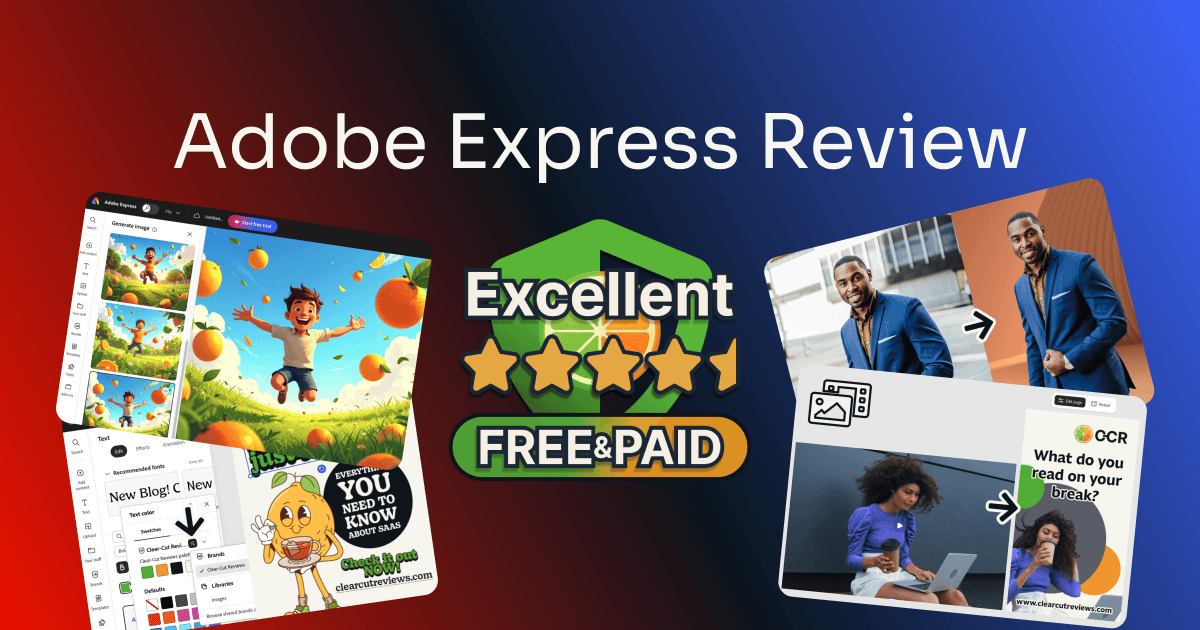
I tested Adobe Express on a free account and on Premium, with my own photos, clips, and prompts. You’ll see where the free account stops, what each feature did when I used it, and who the upgrade is for.
Table of Contents
This post has no active affiliate links yet. No affiliate program can change my scores.
Quick Verdict
FREE
PREMIUM
Total Score:
4.5 / 5
Pricing: $9.99/mo, no annual commitment
(30-day free trial)
Pros:
- Free: watermark-free 4K from 4K footage
- Clean background removal on the first try
- Firefly AI images licensed for commercial use
Cons:
- Free: Brands builds but never applies
- Firefly drops parts of a detailed brief
Best for:
- Freelancers needing fast, standalone file tools
- Anyone using AI images in client work
- Short social videos without a video editor
Not for:
- Branded content on the free plan
- Free users who need private help
What Is Adobe Express?
Adobe Express makes social graphics, short videos, flyers, and PDFs from templates, in a browser or on your phone, much like Canva. Two things set it apart: Firefly, Adobe’s AI image generator, built into the canvas with commercial use allowed, and a row of quick edits that process a file without opening a design at all.
Adobe’s Express pricing page and its plan comparison, read July and August 2026.
How Much Does Adobe Express Cost?
Adobe Express has a permanent free plan with no card required, and one paid plan for individuals, Premium, at $9.99/month with no annual commitment and a 30-day free trial.
| Plan | Free | Premium |
|---|---|---|
| Price | $0 | $9.99/month, no annual commitment |
| Free trial | None | 30 days |
| Generative AI | Limited daily generations, no number given | 250 credits/month |
| Cloud storage ² | 5 GB | 10 GB |
| Version history | 10 days | 30 days |
| Video length | Up to 30 minutes | Up to 2 hours |
| PDF quick edits | 10 per month | Unlimited |
| Social scheduling | 1 account per network | 3 accounts per network |
| Transparent PNG export | ||
| Premium Express tools ¹ |
¹ Premium Express tools
- Brands and Libraries
- One-click Resize
- Video background removal
- All premium templates
- The paid Adobe Stock collection
² Adobe contradicts itself, with 100 GB on the Premium plan card and 10 GB in the comparison table on the same page. An Express-only account has no storage meter, so I couldn’t settle it. 10 GB is likelier, because the same table gives the pricier Adobe Firefly Pro 100 GB.
Adobe’s Express pricing page also shows Adobe Firefly Pro at $19.99/month with a 7-day trial and a “Best value” badge, for more generative credits, third-party AI models, and full Photoshop on web and mobile. I haven’t tested it. For Express alone, Premium is the cheaper plan with the longer trial.
Premium comes to $119.88 a year. The US page has no annual plan, so there’s no discount for committing, though some regions get one. On canceling, Adobe’s Express pricing page (read October 2026) says billing starts when the trial ends, you aren’t charged if you cancel before then, and the subscription renews until you cancel.
Trial terms can change and can differ by region, so read Adobe’s current terms before you subscribe.
Prices in USD from Adobe’s US pricing page, read 1 October 2026; they vary by region.
Interested?
How I Tested Adobe Express
I tested Adobe Express on two separate accounts, a paid Premium account I use myself and a free account with no trial running, so the free plan’s walls showed up where a new user meets them. Wherever Premium changes the answer, I say so.
The hands-on testing ran in July and August 2026 on both accounts, in a browser on my computer, support and the AI-credit panels included, and I read the plan limits on Adobe’s own pages in the same months.
I didn’t test the desktop Creative Cloud apps, because this review covers Express in a browser. Nor did I open a support case to see how far the Premium advisor route goes, because I had no real question for it. I didn’t test whether Adobe Express is safe for your files either, but Adobe’s company-wide terms, read October 2026, say you keep ownership of your content and that Adobe won’t use it to train its generative AI unless you submit it to Adobe Stock.
| What I measured | Result | Plan |
|---|---|---|
| Background removal on a street portrait | clean on the first pass, no manual correction | Free |
| Video export from a 4K source clip | 3840 × 2160 MP4, 25 seconds, 132 MB, no watermark | Free |
| Firefly images that kept all three fruits in the brief | 2 of 4 | Free |
| Firefly images that showed the man I asked for | 1 of 4 (one borderline, two children) | Free |
| Templates left with the Price filter set to Free | 326,000+ (138,000+ on the default region setting) | Free |
| One-click Resize, Instagram post 1080×1350 to Story 1080×1920 | 3 layouts offered, one nudge needed | Premium |
| AI credits shown in the account menu | Free: “limited”, no number · Premium: “250/250 credits left” with a reset date | Free and Premium |
| The assistant, asked whether a person is reachable | Free: no, not without an active plan · Premium: offered an advisor | Free and Premium |
Is Adobe Express Worth It? Score Breakdown
I scored both Adobe Express plans separately, and both land at 4.5. The team plans aren’t covered, because they’re a different product with an admin console.
FREE
Overall:
4.5 / 5
Brands you can’t apply, no resize, and AI that drops parts of a brief put Features a full point under this score, at 3.5. Even so, it was the strongest of the four free design plans I ranked head-to-head.
4.5 / 5
Ease of use
The half point goes to one trap, a frame’s background color baked into a “transparent” PNG. Otherwise a filter hides paid templates, and most paywalls show before you start.
5 / 5
Value
The free plan gives away background removal and transparent PNG export, both of which Canva charges for.
3.5 / 5
Features
Brands doesn’t apply, a finished design can’t be resized, and Firefly drops parts of a busy brief. The rest of the free toolkit, from photo cutouts to 4K video, did its job.
4.5 / 5
Support
A free account has no private channel to a person. Help is two clicks away, though, and the community answers.
PREMIUM
Overall:
4.5 / 5
Firefly’s dropped details, a video cutout that erased half a laptop, and the PNG trap keep it off full marks. You get Brands and resize, plus a route to an advisor.
4.5 / 5
Ease of use
The “transparent” PNG trap is the same on both plans.
5 / 5
Value
Premium costs less than Canva Pro, whether you pay Canva monthly or yearly, and it adds Brands, resize, and video cutouts.
4 / 5
Features
Firefly still drops parts of a busy brief, and video background removal, Premium only, erased half a laptop. Brands and resize work on this plan.
5 / 5
Support
The assistant offers to connect you to an advisor, the private route free lacks. The Help Center and the community are the same as on free.
On the Support score. I asked the in-app assistant whether a real person was reachable, and on Premium it answered: “Could you briefly describe the issue you’re facing? I’ll try to help or connect you to the right advisor.”
On the free account it said: “It doesn’t look like there’s an active plan linked to [email]. If you sign in with an active plan, I can provide more personalized help and connect you with an advisor.” A free user with a billing or login problem has only a public forum to take it to.
Self-service is free on both plans: when I tested, the help icon, then “Need help”, opened Adobe’s searchable Help Center with a troubleshooting section. The community was busy when I looked: eight of the ten newest discussions had replies, and the two without were minutes old. Adobe staff answer questions there, answers get marked as solved, and free accounts can post; Canva has no public community at all, as my Canva Pro review explains.
Is the free plan enough for you?
Key Features of Adobe Express
Every picture below comes from my own files and briefs, never Adobe’s sample assets.
Free, with limits
Quick Edits: The Most Underrated Part of Adobe Express
Quick edits sit in a row on the Adobe Express homepage, every one usable on free, though PDF quick edits stop at 10 a month. Each does one job without opening a design: Remove background, Generate QR code, Edit PDF, Convert to MP4, Caption video, and a few more. None of them carries a crown, while the template row below is full of them.
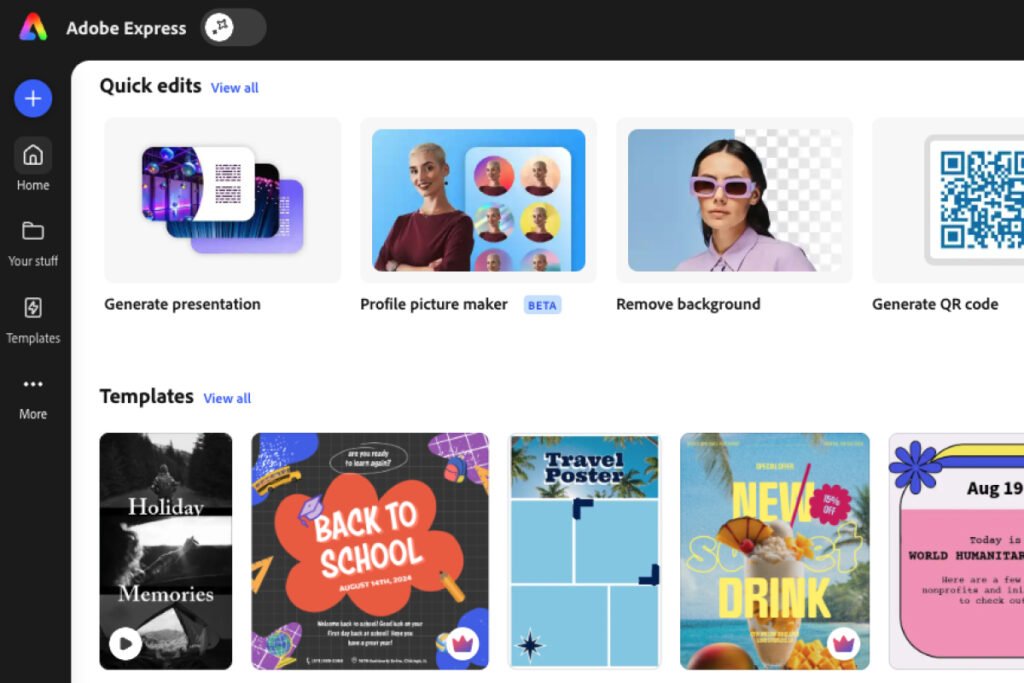
Remove background earns its keep. I ran a street portrait of a man in a suit through it and dropped the cutout onto a studio backdrop.
It came out clean on the first pass, with crisp edges along the jacket and the gap between his raised arm and his body cut out instead of filled in. There was no watermark and no compression.

One catch cost me an export twice, months apart. If the frame has a background color, even white, the download bakes it in and your “transparent” PNG comes back on a white box.
Delete the frame’s color first. The second time, I still had to hunt for the fix.
Generate QR code turns a URL into a styled PNG, free and unwatermarked.
Free, with limits
Adobe Firefly AI: Image Generation That Listens, Mostly
Firefly turns a prompt into four image options inside the Adobe Express canvas, with a limited number of generations a day on free. I gave it a deliberately busy brief: “create a grass field landscape with flying oranges, limes and lemons. With a cartoonish man in the middle jumping in the air with a smile on his face.”
All four were usable, with the composition and mood I asked for. The details slipped. Two dropped the limes and lemons.
Of the man I asked for, one image gave me one, one was borderline, and two were clearly children, so write “adult man” if you need one. And a sliced orange had its stem on the side of the cross-section, a mistake you only catch if you look closely.
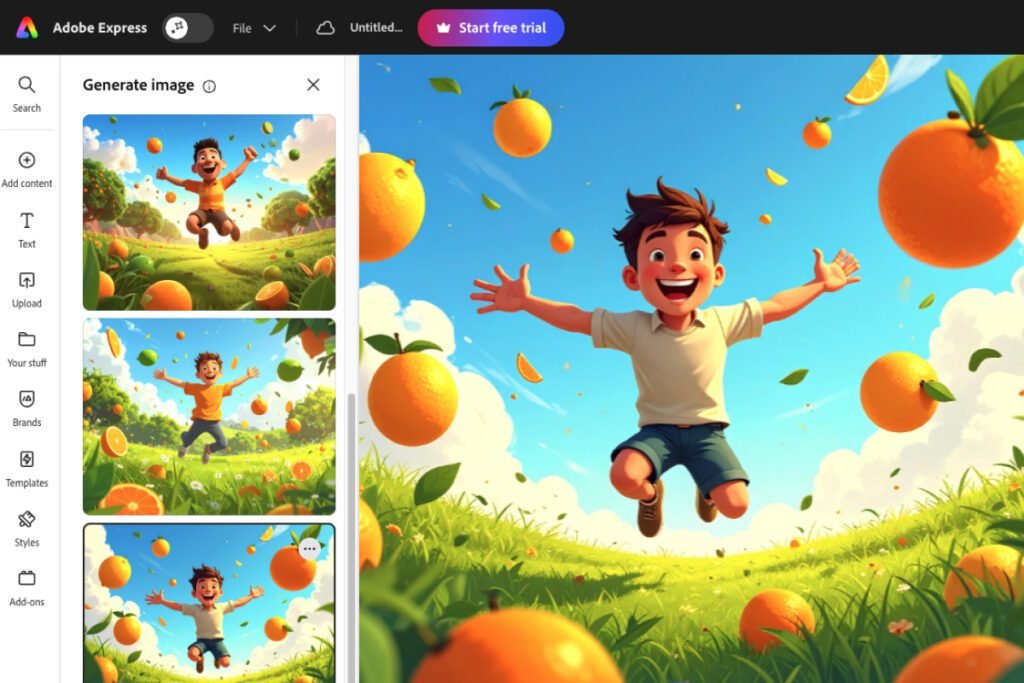
Firefly’s output is licensed for commercial use. Adobe’s plan comparison allows it on free and paid plans.
IP indemnification, Adobe’s promise to defend you if an image is claimed to infringe, isn’t on either individual Express plan, and features labeled beta may be personal-use only.
Only a paying account is told how much AI it has left. On Premium, the account menu’s AI panel read “250/250 credits left”, with its next reset date.
On free, the same panel read: “Enjoy limited complimentary generations per day to explore selected models. Upgrade to keep creating.” No number, so on free you find the ceiling by hitting it.
Text effects, which paint a described style onto a headline, are free. Generated presentations and short AI videos each have a small lifetime cap on free.
Licensing from Adobe’s plan comparison, read July 2026.
Free, with limits
Templates and Adobe Stock: More Free Than You’d Expect
Adobe Express marks Premium templates with a crown, and setting the Price filter to Free hides them. With that filter on, Templates returned over 326,000 results, or over 138,000 on the default region setting, from invoices and certificates to posters and social posts. The Style and Mood filters were the surprise, handy when you know the tone but not the layout.
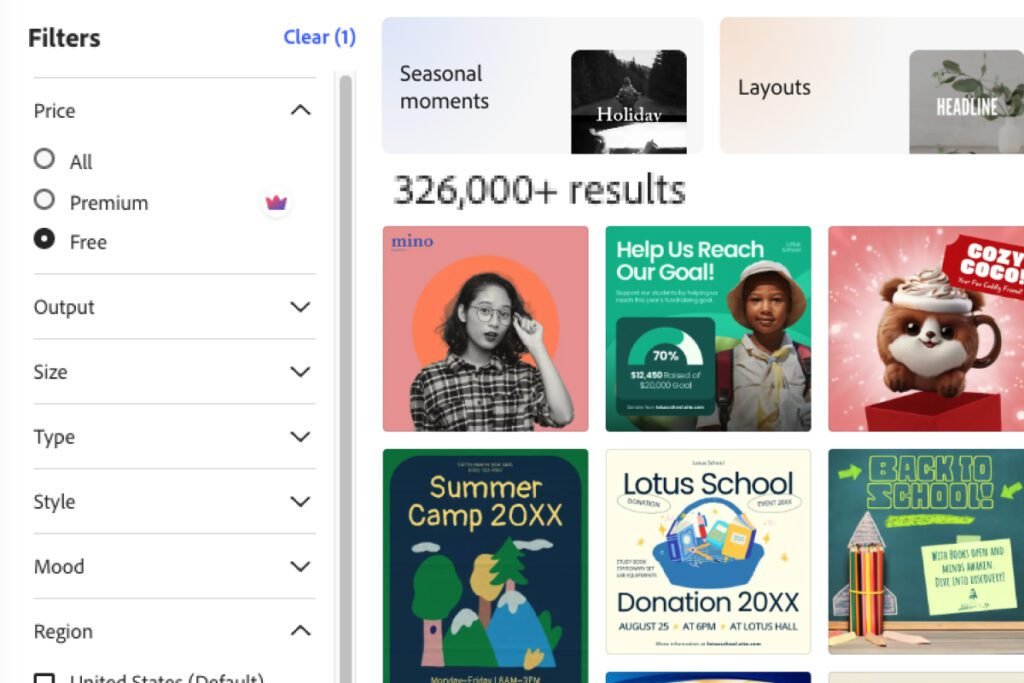
Free accounts also get a share of Adobe Stock, but Adobe can move a free asset to paid without notice. The font recommender is free too, though most fonts it suggests are Premium. I wouldn’t upgrade for it, because the suggestions were off-tone, and with a brand font you don’t need them.
Free, with limits
Video From a Template: 4K Export on the Free Plan
Video is the most generous part of the free plan, with projects up to 30 minutes long (two hours on Premium). Every element sits on its own timeline layer with its own animations. My build took four steps: a template, my logo, the text, then the text colored by sampling the logo, which keeps a video on-brand without the paywalled Brands.
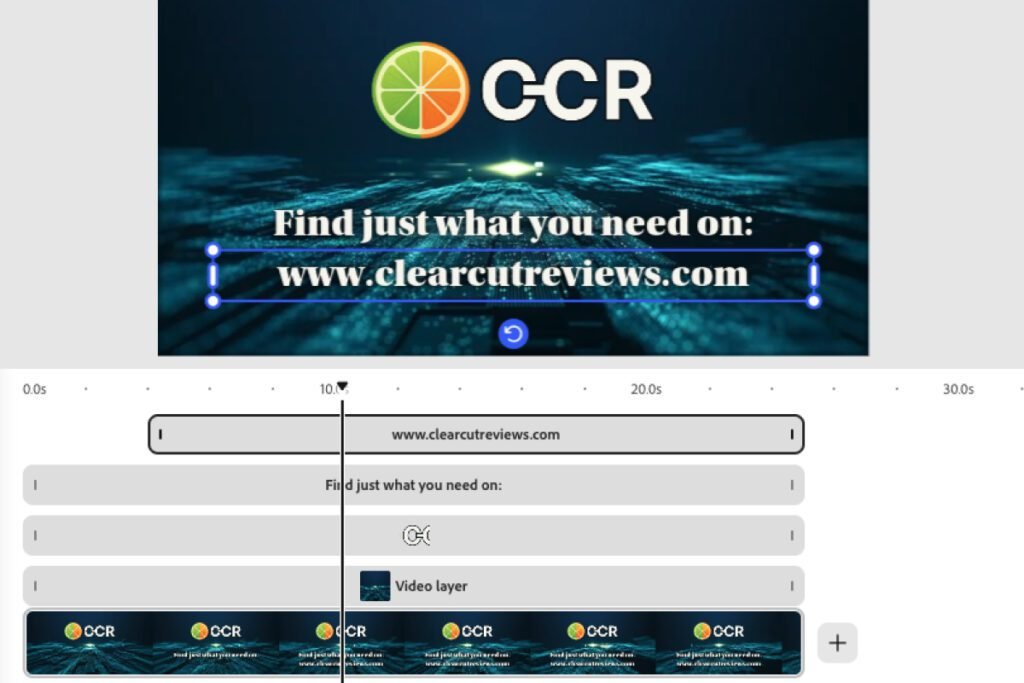
Adobe Express’s free export was a clean MP4 with no watermark at 3840 × 2160, full 4K, 132 MB for 25 seconds. Adobe’s plan comparison lists “Export in 4K” as Premium-only, and the app explains the gap: “Changing video resolution is a premium feature.”
Free exports at the source clip’s resolution. From a 4K clip the dropdown reads “4K (Original size)” above a working Download button; from a 1080p clip, picking 4K raises the paywall.
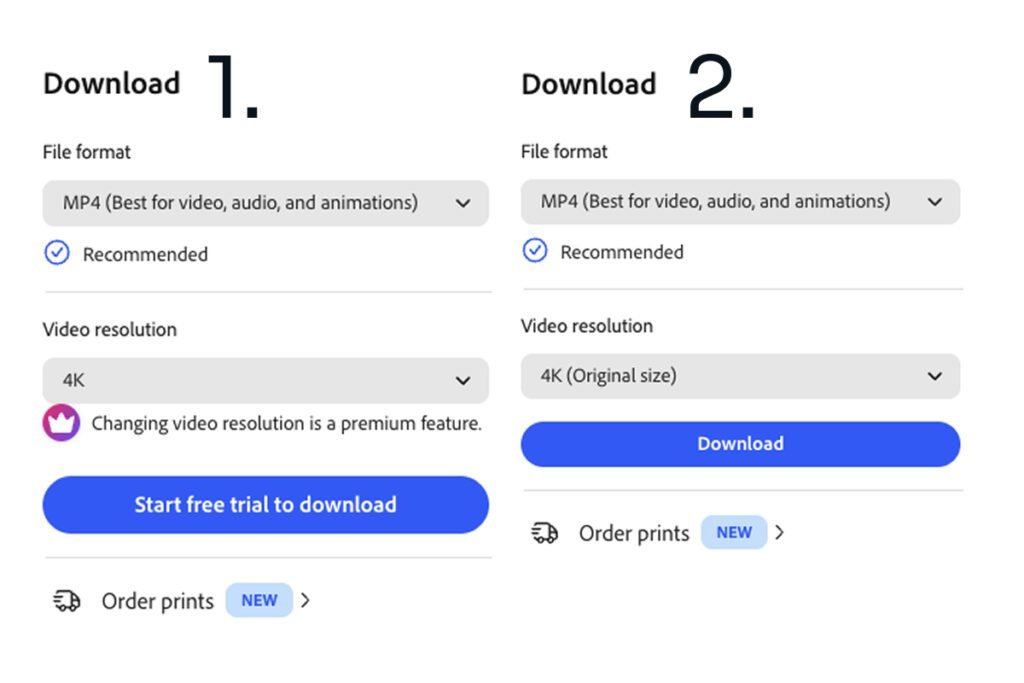
On free you choose your resolution when you choose your clip, and the stock library has no resolution filter to help.
Premium only
Video Background Removal: Excellent, With One Error It Shouldn’t Make
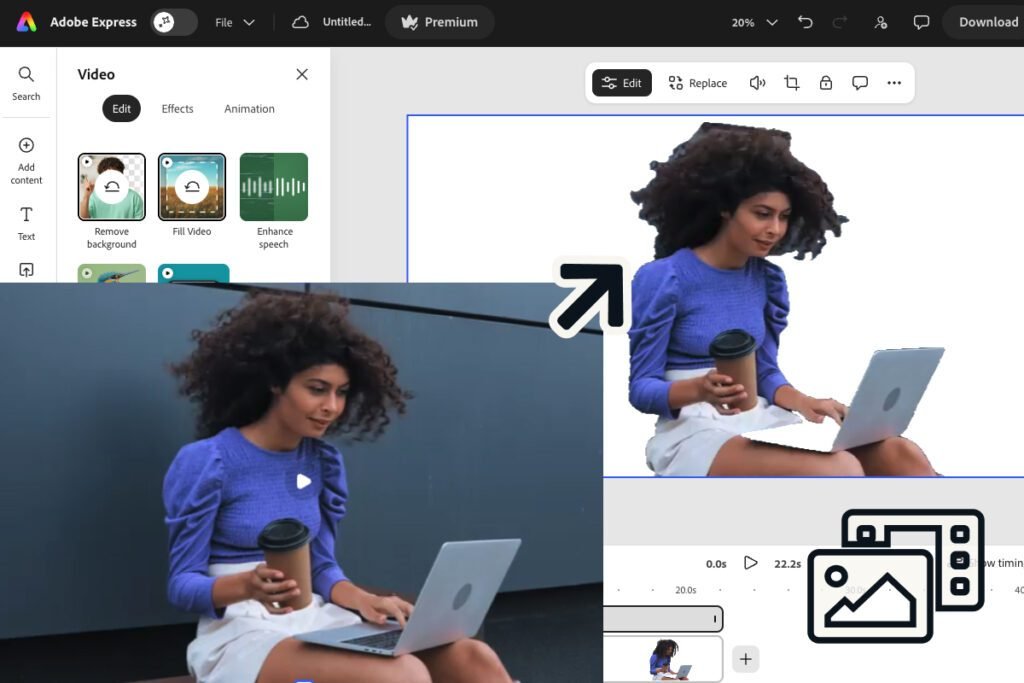
Photo cutouts are free; video cutouts are Premium. I gave it my hardest clip: a woman with long, voluminous curly hair, holding a coffee and a laptop against a dark wall. It got most of the hair, which is where removers usually fail.
A few slivers of background survived between strands, easy to cover with a near-matching shape. The bigger flaw is that Adobe Express erased the bottom half of her laptop, again on a second run, though that half is the same shade as the top it kept. Crop the laptop out and the clip works, but it’s the half point Premium loses on Features.
Premium only
One-Click Resize: The Best Version of This I’ve Tested
A free account can’t resize a finished design at all, because applying a new width and height in the panel raises the paywall. Canva Free blocks this too.
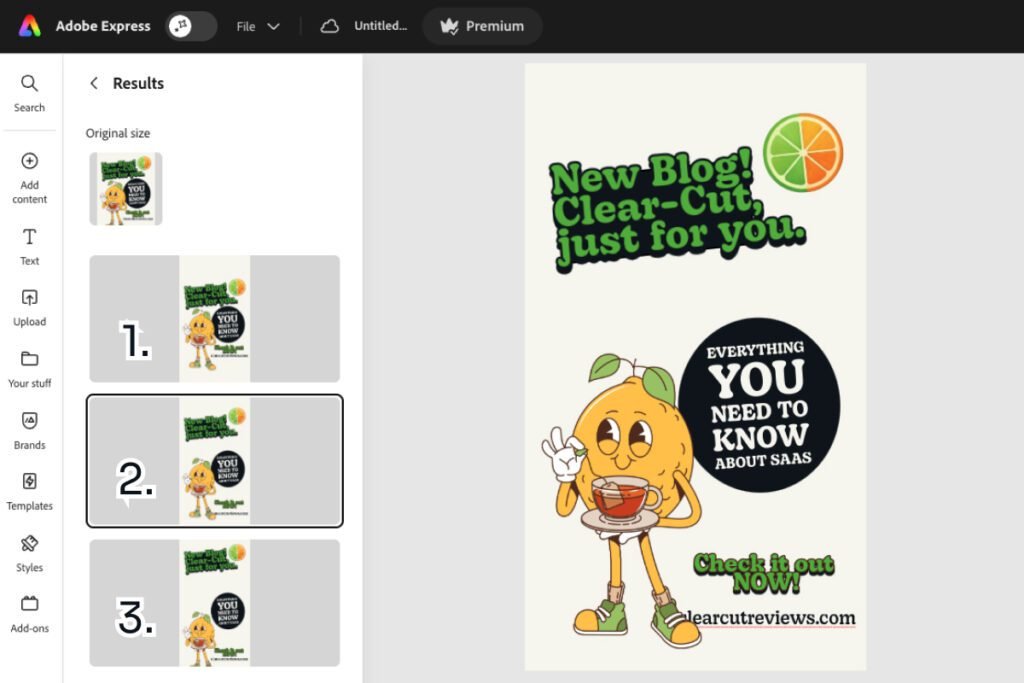
On Premium, I took an Instagram post at 1080×1350 to a Story at 1080×1920, the same conversion I ran on Canva. Adobe Express moved the content into the taller shape and offered three arrangements; only the web address needed a nudge. Canva’s Magic Resize left the content where it was, and I realigned it by hand.
Part free
Part Premium
Brands: Free to Build, Paid to Use
Brands stores your logos, colors, fonts, and graphics. Building one is free, and I added three logo variants and a four-color palette with nothing stopping me. Using it isn’t, and a banner says so before you start: “You’ll need to upgrade to use Brands.”
Locked Brands is the most frustrating limit on the free plan.
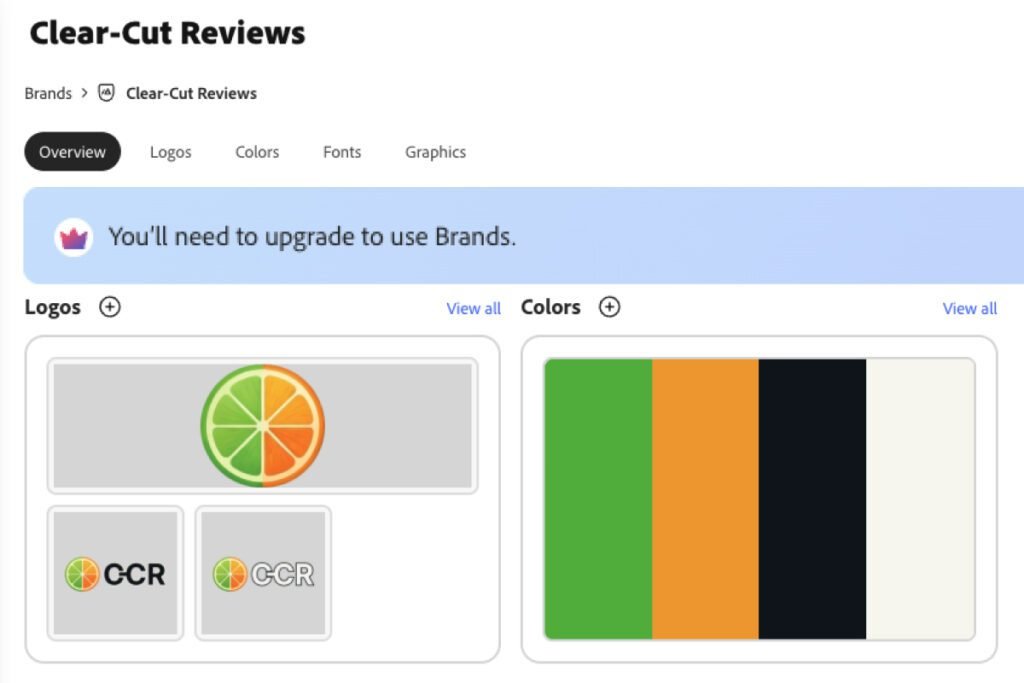
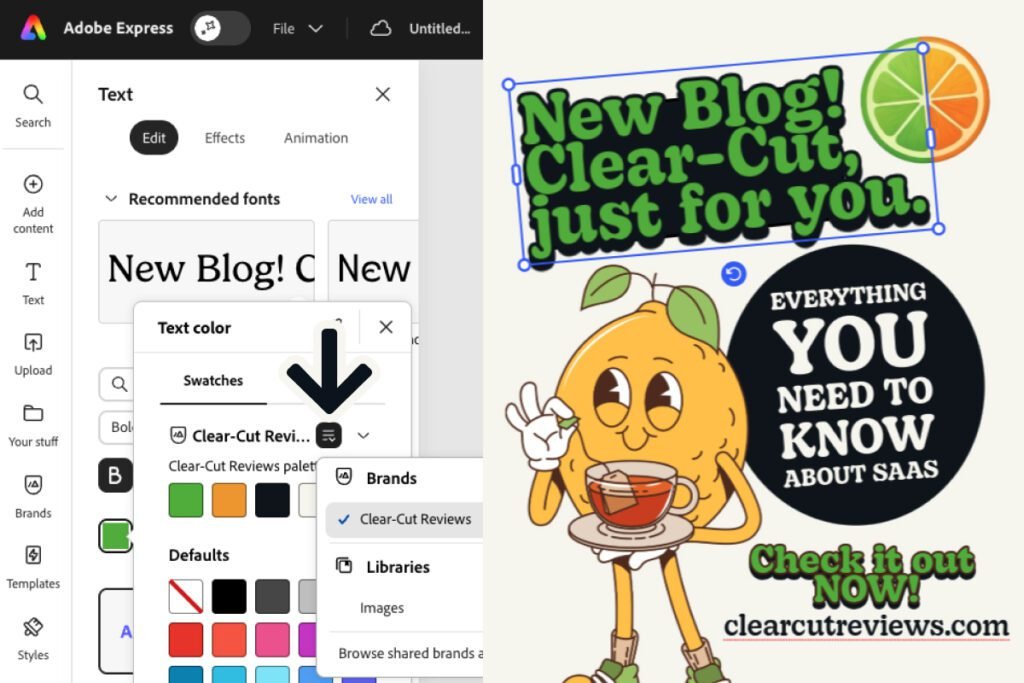
Upload a logo and Express offers a palette sampled from it, handy for client work, though check it against the real brand guide. On Premium, Apply brand repaints a design in one click; on a tea-shop template the result was loud, fine for a rough draft, not for publishing. Coloring each element from the palette looks designed.
And one thing nearly convinced me my brand hadn’t saved: its colors only show in the picker after you pick the brand from a dropdown inside it.
If you also work in Photoshop on the web, a photo I edited there showed up in Express’s “Your stuff” tab minutes later; only images travel, so my cards and posts never reached Photoshop. Libraries, Adobe’s reusable-asset system for “specific projects, clients, or teams”, builds free like Brands, then shows “You’ll need to upgrade to use Libraries.”
Are you convinced?
Adobe Express: Pros and Cons
Pros:
- Free: 4K video exported with no watermark, from a 4K source clip
- Premium: one-click Resize moved the content and offered several layouts
- Background removal cut a street portrait cleanly on the first pass
- Firefly images are licensed for commercial use
- Quick edits handle cutouts, PDFs, video conversion, and QR codes
- One filter click hides every paid template
- Help is two clicks away, and the community answers
Cons:
- Free: Brands applies to nothing until you pay
- Free: no resize of a finished design
- Free: no private route to a person
- Free: the AI allowance has no number and no meter
- Premium: video background removal erased half a laptop
- Firefly drops parts of a detailed brief
- “Transparent” PNGs keep a frame’s background color unless you delete it
Who Should Use Adobe Express?
Who Should Use Adobe Express Free?
FREE
Who it’s for:
- Freelancers who process files every week without a full design suite
- Small business owners posting social content who want video without a video editor
- Anyone putting AI images into client work who needs clear commercial-use terms
Who it’s not for:
- Anyone who needs their brand applied daily and won’t pay
- Anyone who resizes finished designs for other formats
Who Should Use Adobe Express Premium?
PREMIUM
Who it’s for:
- Anyone who turns a feed post into a Story, since one-click Resize moved the content into the new shape for me
- Freelancers who keep a client’s brand on every design
Who it’s not for:
- Happy Canva users, unless Firefly’s licensing or Adobe’s other apps, such as Photoshop, matter to them
- Anyone who needs video cutouts with no cleanup, since mine needed a crop
Free Alternatives to Adobe Express
I tested four free design tools head-to-head, and my Best Canva Alternatives guide ranks them, with Adobe Express at #1.
Canva is the closest match, and its free Brand Kit is thin (three colors, no logos, no fonts) but applies.
Prefer Canva?
VistaCreate let me save three logos and four brand colors on its free plan and drag them onto a design with no crown, the job Adobe Express Free walls off.
Picsart resized a finished design on its free plan with no credits spent, which Adobe Express keeps for Premium.
Frequently Asked Questions
What is Adobe Express used for?
Adobe Express is used for making social posts, short videos, flyers, and PDFs from templates, by people who aren’t designers. It also runs one-job quick edits, such as removing a photo’s background or making a QR code, and makes AI images with Firefly that you may use commercially.
Is Adobe Express completely free?
Yes. The free plan has no expiry and needs no payment details. It includes the quick edits (PDF ones capped at 10 a month), limited daily AI generations, transparent PNG export, video up to 30 minutes, and 5 GB of storage. Brands, Libraries, resizing, and 250 monthly AI credits require Premium.
What is the difference between Adobe Express free and premium?
Brands is the biggest difference, because on free you can build a brand but not apply it. Premium also adds one-click Resize, video background removal, 250 AI credits with a visible balance, premium templates, two-hour videos, and unlimited PDF quick edits. Premium’s assistant offers you an advisor too.
How much does Adobe Express cost?
Premium is $9.99/month with no annual commitment, which comes to $119.88 a year, and Adobe’s pricing page says you aren’t charged if you cancel before its 30-day free trial ends. Adobe Firefly Pro, at $19.99/month, is the bigger AI plan, with more generative credits and full Photoshop on web and mobile. Prices are in USD and vary by region.
Is Adobe Express better than Canva?
On the free plan, yes: Adobe gives away background removal and transparent PNG export, which Canva charges for. Canva Free’s brand colors do apply where Adobe’s Brands doesn’t, and Canva followed the same detailed image prompt more closely. My Adobe Express vs Canva comparison runs both on the same jobs.
Can I use Adobe Express AI-generated images commercially?
Yes, on free and paid plans, because Adobe’s plan comparison allows commercial use on both (read July 2026). IP indemnification isn’t included on individual plans, and beta features may be personal-use only.
Final Verdict: Is Adobe Express Worth It?
Adobe Express is the free design tool I’d point a freelancer to first. Quick edits handle the weekly file jobs, Firefly makes images you can put in client work, and video exports with no watermark, at 4K if your clip is 4K. Premium is worth its price for one-click Resize alone.
A free user can build a brand and never apply it, which makes the free plan frustrating for daily branded content. Firefly needs its details checked.
FREE
Overall:
4.5 / 5
4.5 / 5
Ease of use
5 / 5
Value
3.5 / 5
Features
4.5 / 5
Support
PREMIUM
4.5 / 5
4.5 / 5
Ease of use
5 / 5
Value
4 / 5
Features
5 / 5
Support
Evidence verified: August 2026.

By Jonas Moons, founder & reviewer
I test every tool on Clear-Cut Reviews myself. No ghostwriters, no faceless team. If a tool falls short, I say so, even when it earns me nothing.